A data model is the organizational structure of data: the kinds of values to store and the way each data point is described. It can use one or many structures, including tables, arrays, and objects. Decide on it before collecting data, rather than discovering halfway through that an essential field is missing. section 3.1.3 section 8.3.1
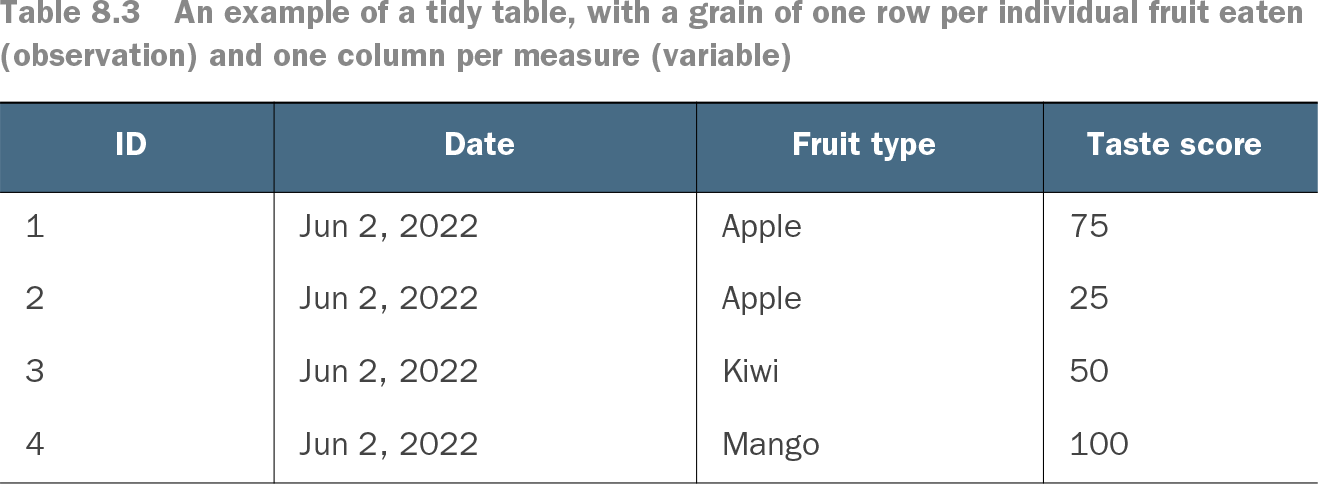
For a fruit log, a useful model might record an ID, date, fruit type, and taste score. The point is not to make a grand database cathedral; it is to capture the details needed for the questions and visualizations you plan to support. section 3.1.3 section 8.3.1
Shape the model alongside research and design rather than letting one get far ahead of the others:
- Check whether the needed data exists, where it lives, how often it updates, and what access or row-level security constraints apply. section 8.2.2
- Define metrics early, including their calculations and required inputs. A conversion rate, for example, needs a numerator, a denominator, and often a way to connect purchases to visits. section 8.2.3
- Prefer less-aggregated data when possible: further aggregation can be added later, while lost detail cannot be recovered. section 8.3.1
For many visuals, one data structure is enough. A tidy table has one row per observation and variables in columns; a wide tidy table gives BI tools flexibility to aggregate for different designs. Aggregate or tall tables can be useful when the destination or coding approach calls for them. section 8.3.1
Fruit data at two grains
A tidy fruit table can hold one row per piece eaten, with date, fruit type, and taste score. An aggregate version instead holds one row per fruit type, such as apples with a count of 2 and an average taste score of 50. The grain—the meaning of one row—changes what the visualization can readily do. section 8.3.1
Table 8.3 An example of a tidy table, with a grain of one row per individual fruit eaten (observation) and one column per measure (variable) (view table figure)
Inspect a tidy table where each row represents one fruit observation and each column represents a variable. section 8.3.1