A data model turns an application's needs into an organized plan for storing information. For a haiku app, identify users and haikus, then describe each entity's attributes and relationships: usernames, passwords, haiku text, authors, numeric IDs, and creation times. section 8.2.2
Figure 8.3 Entity-relationship (ER) diagram showing User and Haiku entities with their attributes
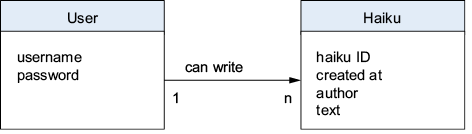
Use the entity-relationship diagram to see the User and Haiku entities, their attributes, and the relationship between them before designing tables. section 8.2.2
Translate the model into a relational database schema:
- Turn entities into tables, such as users and haikus. section 8.2.2
- Turn attributes into columns, with a primary key uniquely identifying each row. section 8.2.2
- Represent a one-to-many relationship with a foreign key; the haikus.author column points to users.username. section 8.2.2
A small haiku-app schema
The users table stores one row per user, with username as its primary key. The haikus table stores one row per haiku, with haiku_id as its primary key and author as a foreign key referencing users.username. This structure supports creating, reading, updating, and deleting records. section 8.2.2 section 8.7
Figure 8.4 Database schema with a foreign key relationship between the users and haikus tables
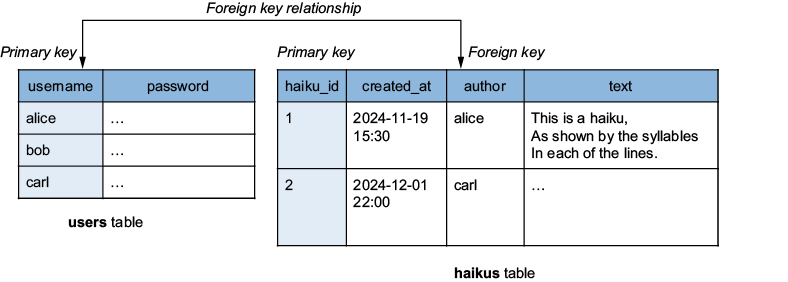
Use the database schema diagram to connect the conceptual entities with concrete tables, columns, primary keys, and the foreign-key relationship. section 8.2.2






















