Duplicate Address Detection (DAD) checks whether an IPv6 address is already in use before an interface communicates with it. The address remains tentative until the check finishes. DAD runs when an address is configured and whenever an interface initializes. section 21.1.4
DAD follows this sequence:
- Send a Neighbor Solicitation (NS) message to the address's solicited-node multicast address. section 21.1.4
- Wait for a response. No response allows the host to mark the address unique and use it. section 21.1.4
- Treat a Neighbor Advertisement (NA) response as evidence of a duplicate; the address cannot be used. section 21.1.4
Figure 21.4 R2 uses DAD to verify that its Ipv6 address is unique. (1) Configure R2’s address. (2) R2 sends an NS message to its own solicited-node multicast address. (3) R2 waits for a response. (4) R2 doesn’t receive a response, so the address is unique.
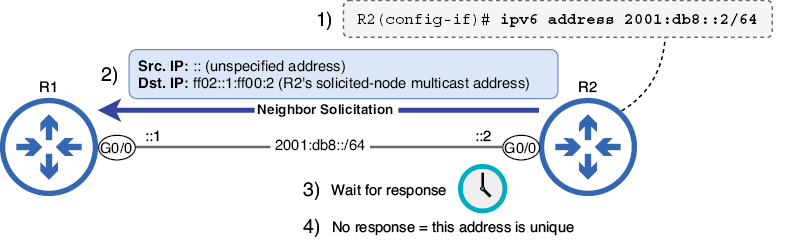
Follow the router scenario from address configuration through the NS probe, waiting period, and uniqueness decision. section 21.1.4
Cisco duplicate-address warning
After configuring an IPv6 address and enabling the interface, Cisco IOS can display a duplicate-address warning. The address appears as [DUP] in show ipv6 interface. Remove the conflicting address with no and configure a unique address. section 21.1.4
