Empathy means understanding and responding appropriately to another person’s perspective, feelings, and needs. In web design, it turns attention to the user’s experience into practical decisions about flow, feedback, accessibility, performance, and communication. section 1.1.2 section 5.4
Making a wait feel more human
A website scanner placed developers in a queue while their code was analyzed. To soften the frustration, the waiting screen showed a mascot working overtime in a dark room. One developer expected to be angry about waiting but instead felt concern for the mascot. The illustration did not remove the underlying performance problem, but it acknowledged the user’s impatience while a backend improvement was developed. section 1.1.2
Use empathy as a practical design habit:
- Identify a target user and imagine both the positive and negative points in their journey. section 5.4
- Map the task with a user flow, then look for moments where the experience can be improved. section 5.4
- Treat interface choices and technical decisions as connected; temporary visual reassurance should not replace fixing slow or limiting systems. section 1.1.2
- Prototype and test early so usability problems are found before changes become costly. section 5.4
Figure 1.1 The waiting queue for the website scanner showed the narwhal mascot that was working overtime to get a website scan done for a developer.
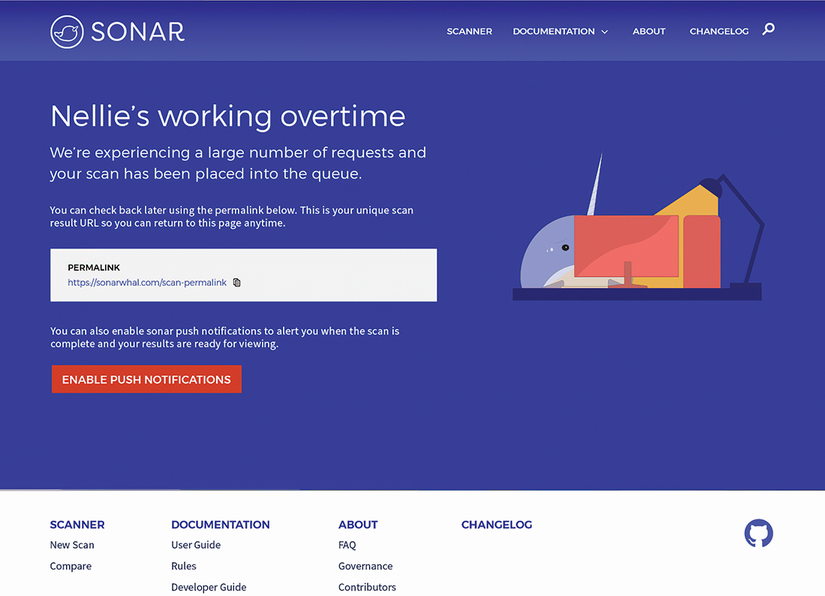
Use the waiting-queue illustration as a concrete example of acknowledging user frustration through interface design. section 1.1.2


