liveBook · Manning

Event

As explained in Secrets of the JavaScript Ninja, Second Edition

A detectable occurrence, such as a user action or timer firing, to which a program can respond.

An event is an occurrence the browser detects, such as a click, timer firing, or network response. Browser applications are largely event-driven: code commonly runs in response to events. section 1.2

The browser processes detected events one at a time:

  • It places events in a queue in the order they are detected. section 2.3.1
  • When an event reaches the head of the queue, the browser runs its associated handler, if one exists; other events wait. section 2.3.1
  • Keep handlers brief: a long-running handler delays other events and can make the application unresponsive. section 2.3.1
Figure 2.8. In the event-handling phase, all events (whether coming from the user, such as mouse clicks and key presses, or coming from the server, such as Ajax events) are queued up as they occur and are processed as the single thread of execution allows.
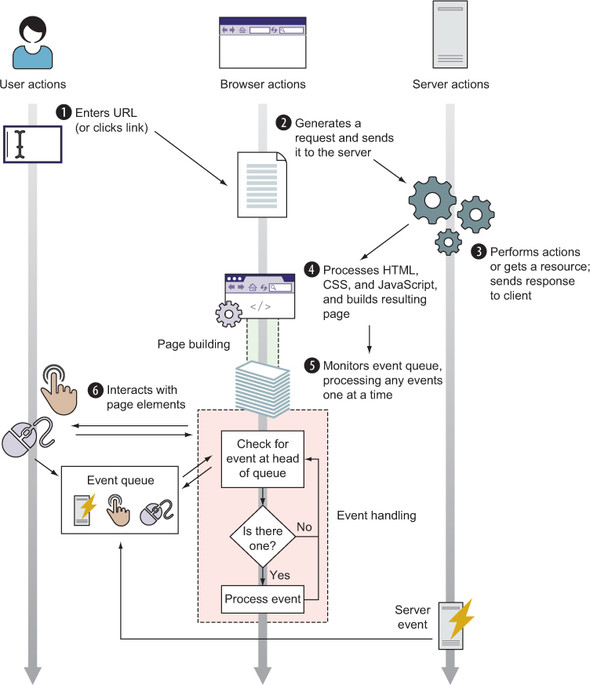
See how user and server events wait in a queue while the browser’s single thread processes them. section 2.3.1


How Secrets of the JavaScript Ninja, Second Edition covers it

How deep it goes
Explains queued, one-at-a-time handler execution, while deferring detailed event-loop effects to later treatment.
Examples
Uses clicks, mouse moves, keyboard presses, timers, and network or Ajax events as examples.
What you can do after
Understand how browser events queue for handlers and why long-running handlers can make applications unresponsive.
How it connects
Links events to event handlers, event queues, single-threaded execution, timers, and the browser.

Also explained in

Compare how 18 books explain event →

Related concepts

This explainer was generated by Manning's knowledge graph from the text of Secrets of the JavaScript Ninja, Second Edition. The section links point to the parts of the book it draws on.















