A file system organizes blocks into files, directories, and links so an operating system can provide applications with persistent file access. Applications use system calls such as open, read, and write; the operating system and file system translate paths into storage locations. section 8.0 section 9.1
On AWS, block storage such as EBS must be attached to an EC2 instance running an operating system. A newly created volume needs a file system, such as XFS, before it can be mounted and used. section 8.0 section 8.1.2
Choose the storage arrangement according to how the application accesses its files:
- Use EBS when one EC2 instance needs persistent files, including operating-system or database state. The volume remains independent when detached and reattached. section 8.1.2 section 9.0
- Use an instance store for temporary data, caching, or systems that replicate their own data; it is ephemeral storage attached directly to the host. section 9.0
- Use EFS when multiple EC2 instances must read and write the same files. EFS uses NFSv4.1, spans Availability Zones, and provides higher stated uptime than EBS. section 9.0
Create and mount an EBS file system
Inspect the attached device, create an XFS file system, mount it at /data, and verify the result: sudo mkfs -t xfs /dev/xvdf; sudo mkdir /data; sudo mount /dev/xvdf /data; df -h. Files written under /data remain available after unmounting, detaching, reattaching, and mounting the volume again.
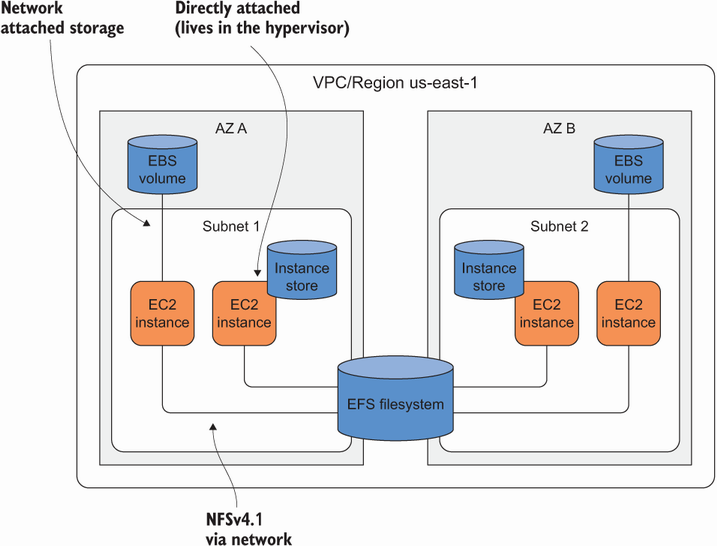
Compare EBS, instance stores, and EFS by persistence, attachment model, and suitability for shared access. section 9.0



