A filesystem organizes, stores, and exposes files through operations such as reading and writing. In containers, each container starts with an isolated filesystem derived from its image. Mounting attaches another volume or storage filesystem at a location in that file tree. section 9.1 section 2.1.2
Container filesystems have several operational distinctions:
- Image files are present when a container starts, but changes made inside the container disappear when it is replaced after termination. section 9.1
- A volume preserves all or part of an application filesystem across container restarts when mounted into the pod and container. section 9.1
- Containers in one pod still have separate mount namespaces; mounting the same volume into both lets them share selected files. section 5.1.1
- A hostPath volume exposes a path from the node filesystem, such as /run/xtables.lock or /lib/modules, to a pod container. section 17.2.2
A node filesystem exposed through hostPath
A kube-proxy DaemonSet uses hostPath volumes to access the node’s /run/xtables.lock file and /lib/modules directory. This enables a per-node process to use host networking-related files and installed kernel modules. section 17.2.2
Figure 9.1 Mounting a filesystem into the file tree
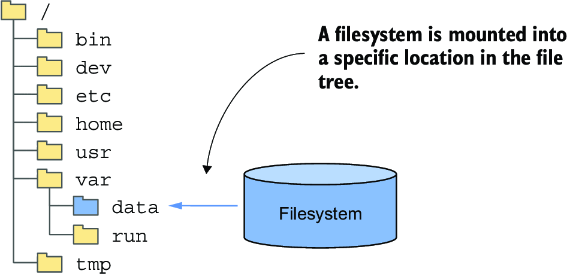
Use the filesystem-mounting diagram to see how a volume becomes available at a location inside a container’s file tree. section 9.1



