Data transformation converts ingested raw data into useful, actionable information that meets defined user requirements. In a Snowflake pipeline, it sits between ingestion and presentation: source data is shaped into a format that downstream reporting, analytics, data science, or other consumers can use efficiently. Transformation rules commonly come from analysts, architects, or users; in smaller teams, engineers may define them with business users. section 1.2.2 section 1.2 section 1.5
Figure 2.1 Data pipeline that takes CSV files from a Snowflake internal stage, loads the data into a staging table, merges the data from the staging table into the target table, and transforms the data for downstream consumption
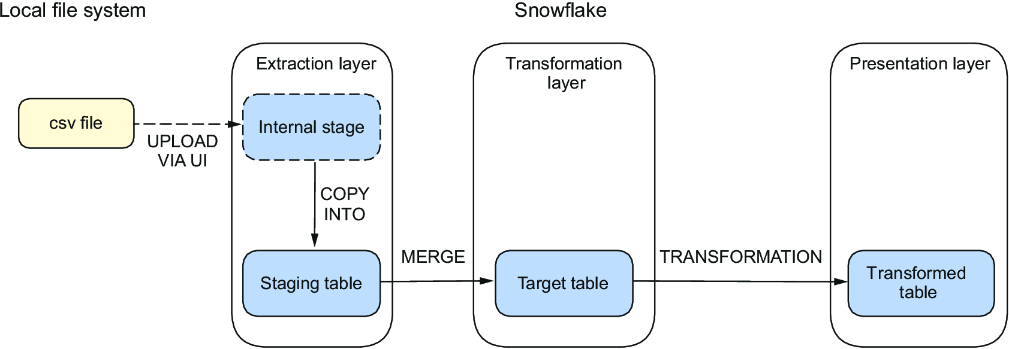
A practical pipeline sequence stages CSV files, loads a staging table, merges into a target table, transforms the data, and exposes the result to downstream consumers. section 2.0
A common implementation first loads files into a staging table, then appends or merges rows into a target table designed for the transformation layer. SQL statements or stored procedures produce a transformed table for reporting. SQL views are an alternative when easy maintenance and avoiding reloads matter, but a view may not meet consumer performance needs; materializing data can be the better choice in that case. section 1.3 section 1.3
Choose a transformation approach based on the pipeline and operational requirement:
- Use SQL queries, functions, or stored procedures for transformations executed in Snowflake. section 1.2.2
- Use Snowpark when transformation logic is written in Python, Java, or Scala, including supported open-source libraries. section 1.2.2
- Use views for maintainable transformations without reloading data; materialize data when view performance is insufficient. section 1.3
- Add validation rules so consumers receive reliable, consistent data; flag or exclude records that fail required checks. section 1.2.2
Scheduled bakery order summary
A bakery collects emailed customer orders in daily CSV files. The pipeline stages a file, uses COPY to load a staging table, uses MERGE to add new data to a target table, and uses SQL to summarize orders into a reporting table. A Snowflake task can run the SQL sequence daily. When handling semistructured JSON, flatten the data into relational tables and encapsulate further transformations in stored procedures. section 2.0 section 2.6 section 4.0
Robust transformation pipelines account for integrity and reruns. Because standard Snowflake tables do not enforce primary-key or foreign-key constraints, pipelines can validate for violations explicitly. Exception handling and logging help identify failed or incomplete execution, support restarting after a fix, and avoid duplicating data on a second run. section 1.2.2 section 4.0



















