Conditional logic selects which code runs by testing a condition or decision. In interactive apps, it connects user actions and application state to visible interface changes. section 4.3.3 section 9.4
Apply conditional logic to:
- Run an action only when a button expression evaluates to True, such as adding a task after a user clicks Add task. section 4.3.3
- Branch the interface from a stored status: show a spinner while obtaining or evaluating an answer, an input while asking, and feedback after evaluation. section 9.4
- Prevent repeated work by allowing each sequential action and language-model request only in its appropriate state. section 9.4
A state-driven question game
Store a status such as GET_QUESTION, ASK_QUESTION, EVALUATE_ANSWER, or STATE_RESULT. Test that status with if and elif branches, then call the matching game method or render the matching Streamlit element. After each transition, rerun the app so the new branch becomes visible. section 9.4
Figure 9.7 Conditional branching in the frontend based on the game’s state
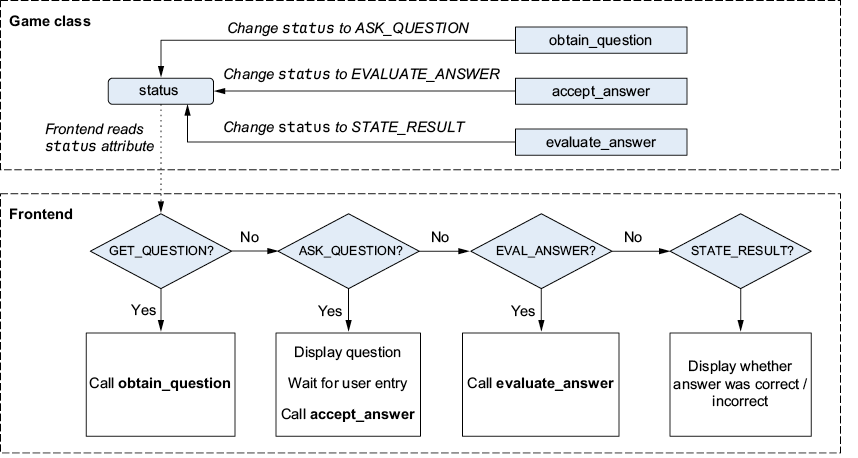
Trace how a central game status branches the frontend into different display elements. section 9.4




















