A Jupyter Notebook is an interactive environment for running code in separate cells and reusing their results. It suits exploratory financial research because each investment hypothesis can be tested, revised, or rerun without building a dedicated frontend. section 3.3
Use notebooks to combine data collection, analysis, and lightweight storage. A practical workflow can merge broker or exchange data with manually tracked holdings, store records in SQLite, and export asset categories to separate spreadsheet worksheets. section 6.1
A notebook-based research workflow can:
- Record an investment hypothesis and explore data to support or disprove it. section 3.3
- Rerun cells with different data or adapt them for alternative analyses. section 3.3
- Consolidate holdings from multiple sources while retaining manually entered assets that lack API access. section 6.1
- Call language models with reusable prompts and export responses for later review and fact-checking. section 9.2 section 9.2.2
Asset monitor
Build a notebook that collects stock, crypto, and bond holdings from available platforms, reads offline assets from an SQLite table, calculates portfolio value and projected annual returns, and exports each asset category to a spreadsheet tab. Treat missing APIs as a data-quality constraint rather than assuming the pipeline is complete. section 6.1
Figure 6.1 Data Flow from asset data to worksheets in a Google Sheets document
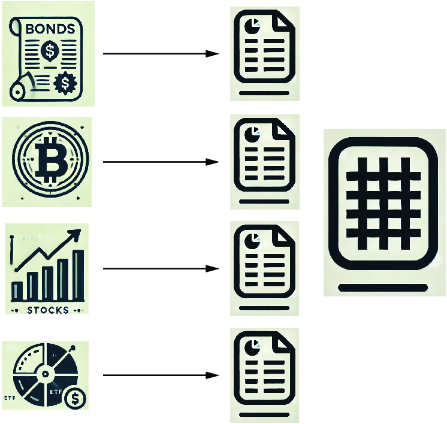
Trace how asset data moves through collection and consolidation into dedicated spreadsheet worksheets. section 6.1



