A line plot represents values across time by connecting observations, making trends, growth trajectories, and differences between groups easier to follow. It turns performance metrics into a visual narrative for stakeholders. section 7.3.2
Use line plots when comparing segmented metrics over time. They can clarify trajectories more effectively than grouped or stacked bars, but too many lines or unfamiliar encodings can overwhelm readers. section 7.3.2
Figure 7.22 Line graphs are typically easier to interpret when visualizing trends between groups over time.
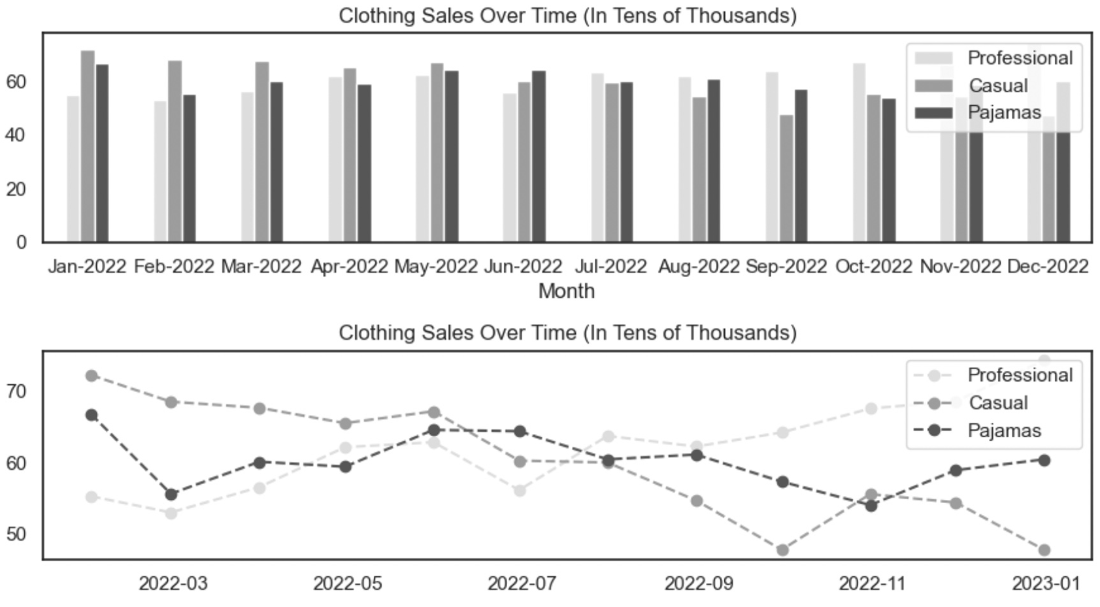
Compare trends between groups over time through distinct lines. section 7.3.2
Build and review a line plot with these practical checks:
- Match the chart to the question and decide whether stakeholders need an overall or segmented view. section 7.3.2
- Label lines and dashboard sections clearly, then add filters or grouping variables that support stakeholder work. section 12.3.3
- Inspect axis limits carefully: defaults based on minimum and maximum values can exaggerate fluctuation, while broader limits can make change appear negligible. section 7.3.2
- Use logarithmic scales cautiously when values fluctuate exponentially. section 7.3.2
Weekly performance dashboard
Plot weekly total sales, total items purchased, bounce rate, or average page views per visit. Add filters for useful groupings, arrange the dashboard logically, publish it through the selected analysis tool, and request peer feedback. section 12.3.3





