Multifactor authentication (MFA) strengthens sign-in by requiring a password plus temporary evidence from another credential factor. In AWS, use it to protect the account root user and IAM users from stolen or cracked passwords and access keys. section 5.3 section 5.3.1
Enable MFA through the AWS Management Console:
- Open Security Credentials from the account name in the top navigation bar, then expand Multi-Factor Authentication. section 5.3.1
- Choose Activate MFA and select Virtual MFA Device. section 5.3.1
- Install a smartphone application supporting TOTP, scan the displayed QR code, and follow the enrollment instructions. section 5.3.1
- Repeat the process for IAM users from IAM, Users, the selected user, Security Credentials, and Assigned MFA Device. section 5.3.4
Protecting AWS sign-in
After MFA is activated for the root user, signing in requires both the account password and a temporary token from the configured MFA device. Keep the token separate from the password; YubiKeys and hardware MFA tokens are also supported. section 5.3.1
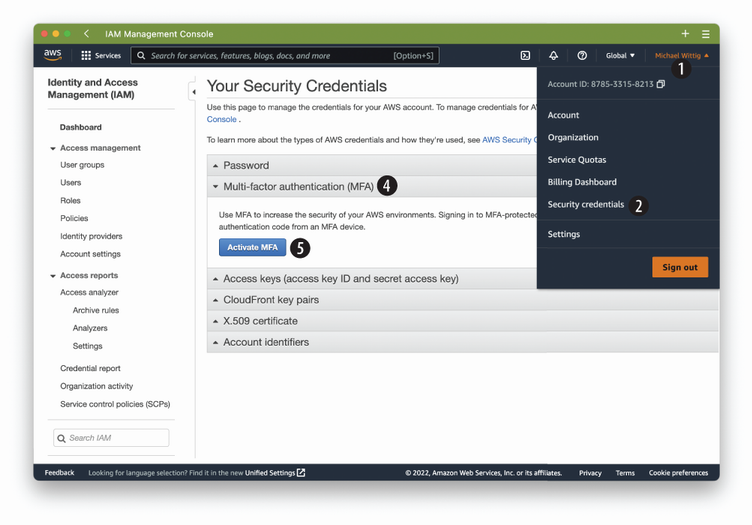
Use the enrollment figure to follow the virtual MFA setup for the AWS account root user. section 5.3.1








