liveBook · Manning

Multifactor authentication

As explained in Azure Security

Multifactor authentication is an authentication method that requires two or more independent factors to verify an identity.

Multifactor authentication (MFA) verifies an identity with a second proof beyond a username and password. It reduces the chance that disclosed credentials alone can provide access. section 2.2.1 section 2.2.2

Common authentication factors include:

  • Something you know, such as a password or PIN. section 2.2.2
  • Something you have, such as a mobile phone, identity card, or FIDO2 security key. section 2.2.2
  • Something you are, such as a fingerprint or retinal scan. section 2.2.2

Microsoft Entra ID can detect suspicious logins and enforce MFA. Conditional Access can require it for selected users, workload identities, cloud apps, or elevated sign-in risk. section 1.8.1 section 2.12

Require MFA for elevated sign-in risk

In Azure Active Directory, open Security > Conditional Access, create a policy named Require MFA for Elevated Sign-In Risk, assign it to Bob and all cloud apps, select Grant Access with Require Multifactor Authentication, and initially set Enable Policy to Report-Only. section 2.12
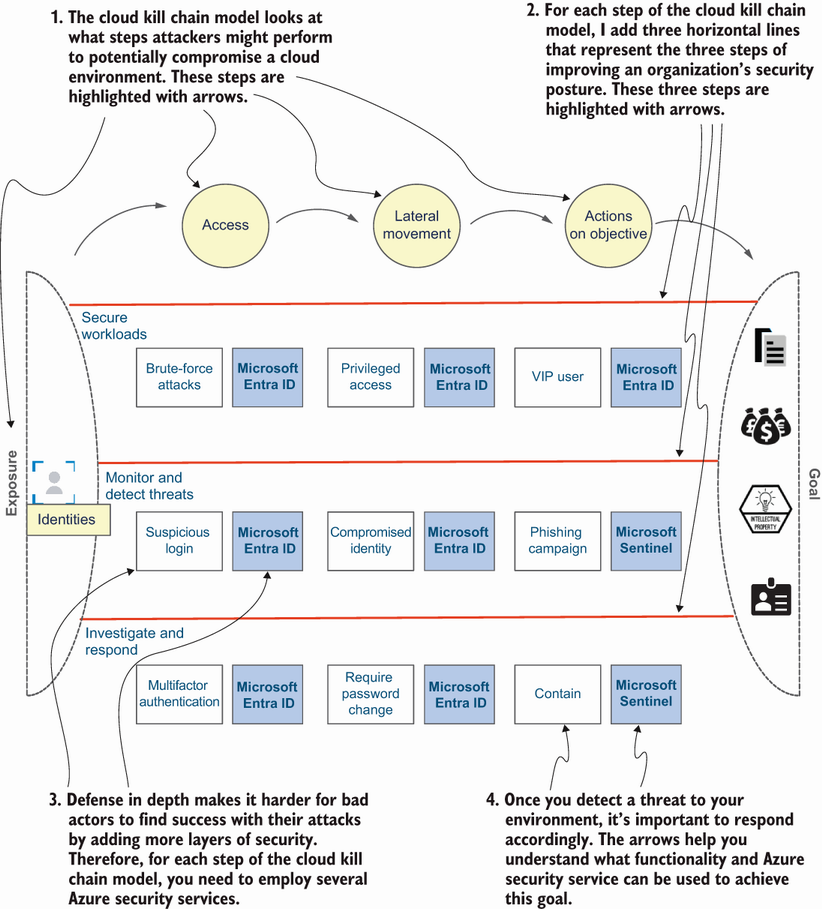
Figure 1.5 Azure security services that can be used to secure identities in your Azure environment

Trace how MFA fits with identity protection, Microsoft Sentinel, and other Azure security services across an attack sequence. section 1.8.1


How Azure Security covers it

How deep it goes
Defines factor types and demonstrates a Conditional Access policy, while deferring broader attack containment to layered Azure security services.
Examples
Uses brute-force risk, Bob's Azure sign-in, FIDO2 security keys, and a report-only Conditional Access policy.
What it assumes
Assumes familiarity with Azure identities and Azure Active Directory while introducing authentication factors from basic credential risks.
What you can do after
Configure MFA through Microsoft Entra ID Conditional Access and test the policy in report-only mode before enforcement.
How it connects
Connects MFA with Microsoft Entra ID, Conditional Access, identity protection, Azure RBAC, Privileged Identity Management, and Microsoft Sentinel.

Also explained in

Compare how 9 books explain multifactor authentication →

Related concepts

This explainer was generated by Manning's knowledge graph from the text of Azure Security. The section links point to the parts of the book it draws on.






