Multifactor authentication (MFA) asks a user for both a password and an extra piece of information before sign-in. Two-factor authentication (2FA) is a form of MFA. The extra information might be a code sent to a phone by SMS or generated by a mobile authenticator app. section 23.1.2
If your ASP.NET Core application manages its own users, ASP.NET Core Identity provides support for MFA alongside password hashing and user lockout. Offering MFA is one part of protecting user accounts; it does not replace careful password handling or other security measures. section 23.1.2 section 29.4.4
To make MFA available through the default Identity UI:
- Let signed-in users open the account-management pages and configure MFA with an authenticator app. section 23.3.4
- Add a QR code generator to the enable-MFA page if you want that setup aid; it is a suggested customization, not part of the described default UI. section 23.3.4
Figure 23.10 Logging in with an existing user and managing the user account. The Login page describes how to configure external login providers, such as Facebook and Google. The user-management pages allow users to change their email and password and to configure MFA.
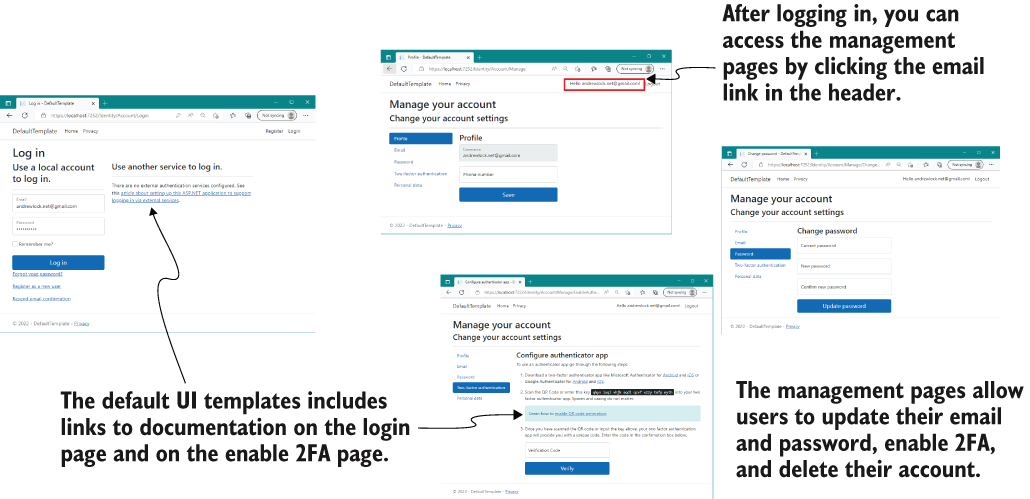
The login and account-management screens show where a signed-in user can find the option to configure MFA. section 23.3.4
Plan for MFA while building authentication rather than adding it as an afterthought. If you store user details yourself, offer MFA alongside safeguards such as hashed passwords and protection against weak or compromised passwords. section 29.4.4 section 29.5








