Multifactor authentication (MFA) verifies identity with two or more independent factors. A stolen password alone is not enough: the attacker must also satisfy another factor, reducing unauthorized access to sensitive accounts. section 14.2
MFA combines factors from distinct categories:
- Something you know: a password, PIN, or security question. section 14.2
- Something you have: a smartphone, security token, or one-time password (OTP). section 14.2
- Something you are: a fingerprint, face scan, or voice recognition. section 14.2
Password plus a one-time password
A user enters a username and password, then supplies an OTP received through SMS, email, or an authenticator app. The system grants access only when both factors are correct. Short-lived, single-use OTPs reduce replay, while rate limits and suspicious-login monitoring reduce guessing and automated abuse. SMS OTPs remain vulnerable to interception, including SIM swapping, so app-based OTPs are preferable where possible. section 14.2 section 14.3
Figure 14.4 The OTP authentication process. The app generates a random OTP and sends it to the user. The user uses the received OTP to authenticate.
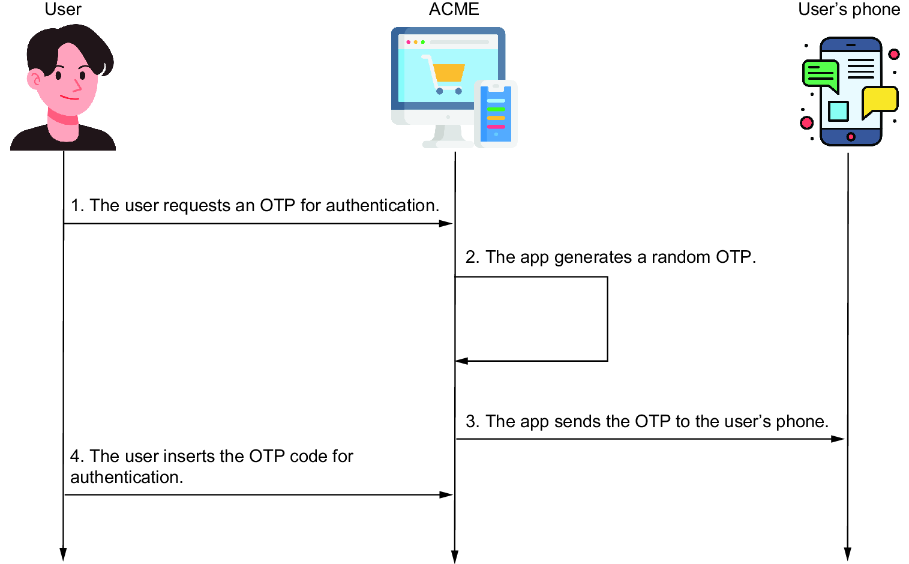
Follow the OTP authentication flow from code generation and delivery to user submission. section 14.2
Modern applications can offer password-based MFA as a fallback alongside passwordless WebAuthn biometrics. Centralizing authentication in an SSO service avoids duplicating security across multiple applications. section 2.1.1 section 2.4








