Quantitative data is numerical research: counts, clicks, time measurements, survey results, and other statistics gathered indirectly from users. It shows what is happening at scale, such as which page elements receive attention, but numbers alone do not explain why users behave that way. section 4.2.1
Use quantitative data to ground design decisions and to check whether reported needs match observed behavior. It is especially useful when an existing site or application already has evidence of a problem; a new project may need to begin with qualitative conversations and collect numbers after launch. section 4.2 section 4.3
Read quantitative results alongside qualitative research:
- Treat analytics and surveys as evidence of patterns, not complete explanations of user intent. section 4.2.1
- Ask qualitative questions when users do not click expected items, so the underlying reason can be investigated. section 4.2.1
- Investigate disagreements between numerical results and user feedback rather than choosing one type of evidence over the other. section 4.2 section 4.3
- Use counts of whether features exist across competitor products as one input to competitive analysis. section 4.2.3
Clicks without the why
A page-click overview can reveal that visitors are ignoring a navigation item or feature. That pattern signals a design question, but interviews, observation, or other qualitative study are needed to learn whether the label is unclear, the placement is missed, or users do not value the feature. section 4.2.1
Figure 4.5 Google Analytics dashboard that details page clicks and average time spent on the page. This data is quantitative because we only have the numbers; we don’t have the why behind the numbers.
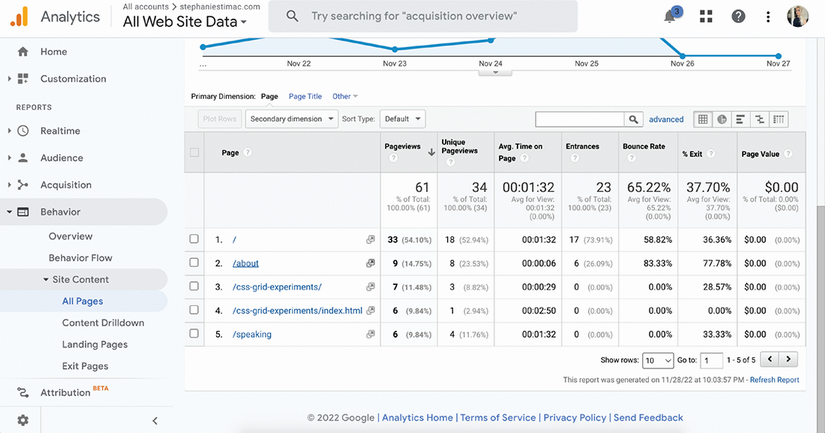
A dashboard of page clicks and average time illustrates quantitative data: it records measurable behavior while leaving users’ reasons unknown. section 4.2.1
Research is not a one-time checkpoint. Combine numerical and qualitative evidence throughout a project to keep user needs central, reduce avoidable revisions, and improve the product experience. section 4.3






