Padding is the whitespace inside an element’s box: it sits outside the content and inside the border. It gives text, images, and other content room to breathe instead of crowding the border or nearby content. section 4.2.3
Figure 4.4 The main parts of an element box
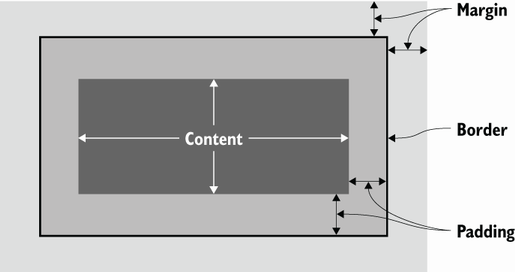
An element box has four layers: content at the center, then padding, border, and margin. Padding is the inner space around the content. section 4.2.3
Set padding one side at a time with padding-top, padding-right, padding-bottom, and padding-left. Each value is a measurement such as px. The padding shorthand combines those side values in one declaration. section 4.2.3
Give a header different space on each side
header { padding: 16px 24px 12px 20px; } This is shorthand for top, right, bottom, and left padding in that order. When every side needs the same amount, use one value: footer { padding: 10px; } section 4.2.3
When adjusting a page, use spacing deliberately:
- Increase padding when content feels crowded and needs more room inside its element. section 4.4
- Keep the px unit when changing a padding number. section 4.4
- Consider converting px measurements to rem measurements for more accessible sizing relative to browser defaults. section 4.4
Padding controls space inside a box; margin controls space outside its border. Change padding to open up an element’s contents, and change margins when separate page items need more or less distance between them. section 4.2.3 section 4.4


















