Padding is the breathing room inside an element: whitespace placed between its content and its border. Like a picture mount around a photo, it stops text or images from feeling crowded. section 9.1 section 9.5
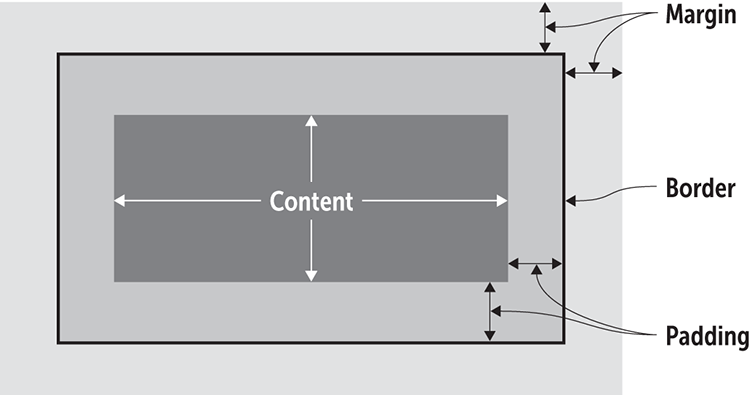
Use the box diagram to locate padding: it sits outside content, inside the border, and before the margin. section 9.1
Set padding one side at a time when each edge needs different space:
- padding-top adds room above the content. section 9.15
- padding-right adds room on the right. section 9.6
- padding-bottom adds room below the content. section 9.15
- padding-left adds room on the left. section 9.15
Four sides, one declaration
Use the shorthand in top, right, bottom, left order: .pullquote { padding: 1em 1.5em .75em 1.25em; } This gives the pull quote different amounts of inner space on each side. section 9.5
Padding can also make navigation easier to scan. Adding padding-right to inline-block list items creates horizontal separation, so labels do not run together. section 9.5 section 9.6
element {
    padding-top: top-value;
    padding-right: right-value;
    padding-bottom: bottom-value;
    padding-left: left-value;
}
Use this four-property pattern when you want to control each padding edge separately. section 9.5


















