liveBook · Manning

Padding

As explained in Web Design Playground, Second Edition

A padding shorthand property is a CSS declaration form that specifies multiple padding side values in one property.

Padding is the whitespace between an element’s content and its border. The padding shorthand property sets padding values in one declaration instead of writing padding-top, padding-right, padding-bottom, and padding-left separately. section 9.1 section 9.7

Use padding to give content room to breathe:

  • Choose standard CSS units such as px, em, rem, vw, vh, or percentages. section 9.3
  • Write individual side declarations when each side needs a distinct value. section 9.3
  • Replace repeated side declarations with one padding shorthand declaration. section 9.3 section 9.7
  • Add horizontal padding to navigation items so labels do not run together. section 9.3

A pull quote with four padding values

Write the four side values in one declaration: .pullquote { padding: 1em 1.5em .75em 1.25em; } This duplicates separate top, right, bottom, and left declarations while keeping the rule compact. section 9.3

Figure 9.4 The syntaxes of the padding shorthand property
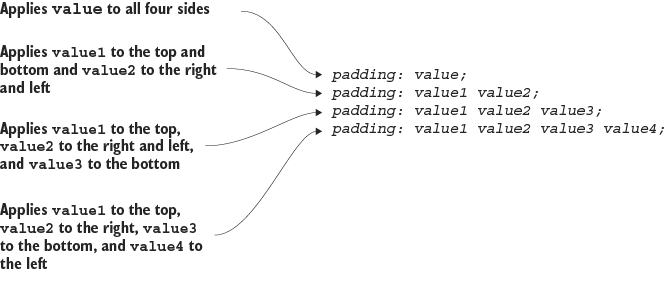
View the syntax patterns for the padding shorthand property. section 9.3


How Web Design Playground, Second Edition covers it

How deep it goes
Defines padding, lists its units and side properties, demonstrates a four-value shorthand, and stops short of deeper layout theory.
Examples
Demonstrates a pull quote and a horizontal navigation menu with added item spacing.
What it assumes
Assumes basic CSS declarations and teaches the element box, its four parts, and padding terminology from the ground up.
What you can do after
Build it from scratch by writing compact padding declarations for content boxes, pull quotes, and navigation items.
How it connects
Connects padding with the CSS box model, content, border, margin, navigation menus, and responsive web design.

Also explained in

Compare how 19 books explain padding →

Related concepts

This explainer was generated by Manning's knowledge graph from the text of Web Design Playground, Second Edition. The section links point to the parts of the book it draws on.
















