A pixel is a tiny, addressable point in a raster image. In an RGB bitmap, each pixel stores red, green, and blue intensity values from 0 to 255, such as (255, 0, 0) for red or (0, 0, 146) for dark blue. section 11.4.1
Working with pixels exposes practical storage and processing trade-offs:
- Stores three uncompressed bytes per pixel; a 1280 × 720 image therefore exceeds 2 MB, while 1920 × 1080 approaches 6 MB. section 11.4.1
- Reduces storage by compressing images or mapping each pixel to a smaller color palette, such as 256 colors. section 11.4.1
Mapping pixels to a reduced palette
Build a nearest-neighbor search structure over sampled colors, inspect each source pixel's (r, g, b) values, find the nearest sampled color, and store that color's index in the destination image. section 11.4.1
Figure 11.9 RGB bitmap format. An image is made of tiny points, its pixels, and for each of them its color is determined by the combination of three primary colors: red, green, and blue, each of which can have an intensity between 0 and 255.
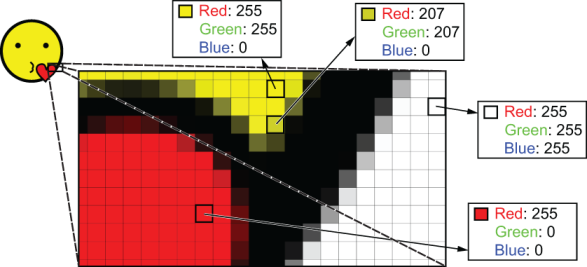
Visualizes how combining three intensity-controlled primary-color channels determines each pixel's color. section 11.4.1









