PowerShell is a command-line shell for running utilities interactively. It also supports scripting, but beginners can start by entering a command, adding parameters, pressing Enter, and observing the result. section 1.0 section 4.2
Its administrative value comes from making product functionality accessible through commands, including tasks that a graphical interface handles poorly or repeatedly. PowerShell supports Windows administration and is also available on Linux and macOS. section 1.1.2 section 1.2
Build familiarity through these core ideas:
- Run commands directly, then save repeated commands in a .ps1 file when the task becomes worth repeating. section 4.2
- Recognize cmdlets by their Verb-Noun names, such as Get-Process, Start-Process, and Stop-Process. section 4.4
- Connect commands with the pipeline instead of repeatedly manipulating formatted text. section 6.0 section 8.2
- Use object properties for filtering and later processing; Get-Process demonstrates how process data can be selected without text-column parsing. section 8.2
Check running processes
Enter Get-Process to display processes. The output includes process names and properties such as identifiers and resource values; those objects can then move through the pipeline for further selection or action. section 8.2
Check the installed version
Open a PowerShell console and enter $PSVersionTable. On Windows, PowerShell 7 installs side by side with Windows PowerShell 5.1 and uses pwsh.exe rather than powershell.exe. section 1.6 section 2.1
Figure 2.1 This shows the different installs available for PowerShell, with the MSI pointed out for Windows installation.
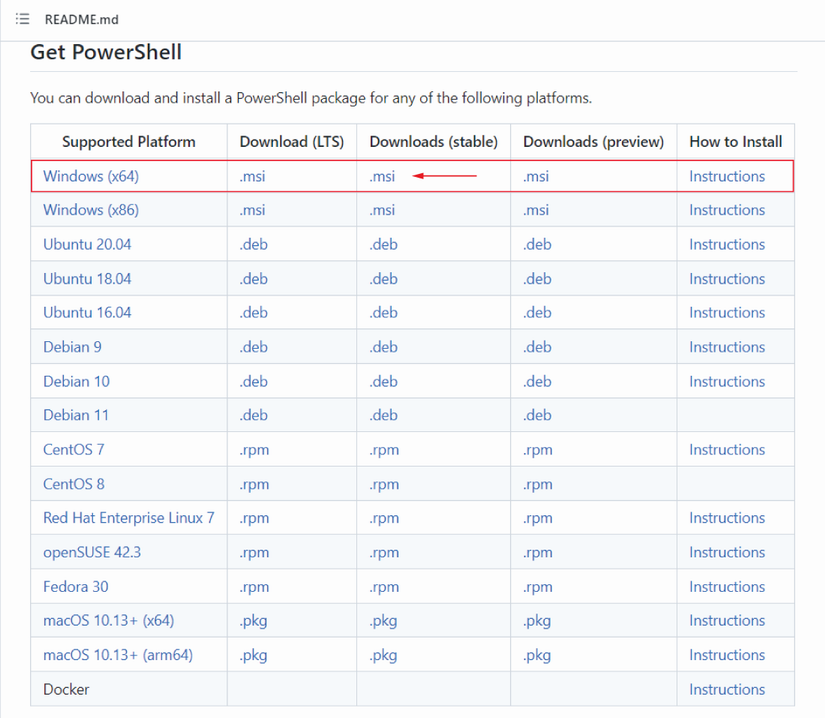
Use the installation overview to distinguish the available PowerShell installation choices when setting up Windows. section 2.1
PowerShell v3, introduced with Windows Server 2012, added more resilient remoting and disconnected sessions. A disconnected session can keep running remotely and later be found and reconnected, so administrators must manage idle sessions responsibly. section 18.5 section 1.1.2



