PowerShell is a task-automation framework and scripting language for turning repeatable IT work into reusable, maintainable workflows. Cmdlets expose administrative tasks and can be chained into logical steps, supporting Microsoft services such as Azure and Office 365 as well as Linux and AWS. Its value is not merely script writing: effective automation plans the process, handles dependencies and permissions, and remains usable by a team as requirements change. section 1.0 section 1.1 section 1.6
Choose PowerShell when it has native support or well-supported modules for the required actions. Azure automation, for example, can use Microsoft-maintained PowerShell modules rather than invoking a separate CLI from another language. Do not force the choice: specialized statistical analysis and charting may be better served by Python, and scheduling, form frontends, and triggers are often responsibilities of companion tools. section 1.4 section 1.4.3
Assess an automation one action at a time:
- Check whether PowerShell natively supports the action, such as file operations or Compress-Archive. section 1.4.1
- If not, look for official modules; Azure Blob Storage is supported through an official Microsoft module. section 1.4.1
- For community modules, evaluate maintenance and update activity before adopting them; dbatools is used as an example for SQL-related work. section 1.4.1
- Reuse existing code and modules only after understanding their behavior, so the resulting automation can be maintained confidently. section 1.4.2
Archive and upload old logs
A log-cleanup workflow illustrates the fit: find files older than 30 days, create an archive with Compress-Archive, upload it to Azure Blob Storage through a module, and record removed files. The decision process checks support for each action rather than assuming one tool covers the whole workflow. Once the script works, place it where a scheduler can access it, satisfy dependencies and permissions, then schedule it with Task Scheduler, Cron, Jenkins, or another appropriate platform. section 1.4.1 section 3.2
PowerShell can run across Windows, Linux, macOS, servers, containers, and cloud platforms, though many operational examples use Windows. PowerShell 7 is the default target, while Windows PowerShell 5.1 remains necessary for some compatibility cases. VS Code supports both side by side; the older PowerShell ISE does not support PowerShell 7. section 1.5 section 8.1
Operational use requires attention to execution context and security. Remote execution is disabled by default on Windows client devices and should not be enabled there; use a systems-management solution for client deployment instead. Test scripts first as an administrator to establish that commands work, then as a standard user and as system to identify permission and resource differences. section 11.4 section 11.4.2
Figure 1.6 The PowerShell decision tree can be used to determine whether PowerShell is the right tool for the job.
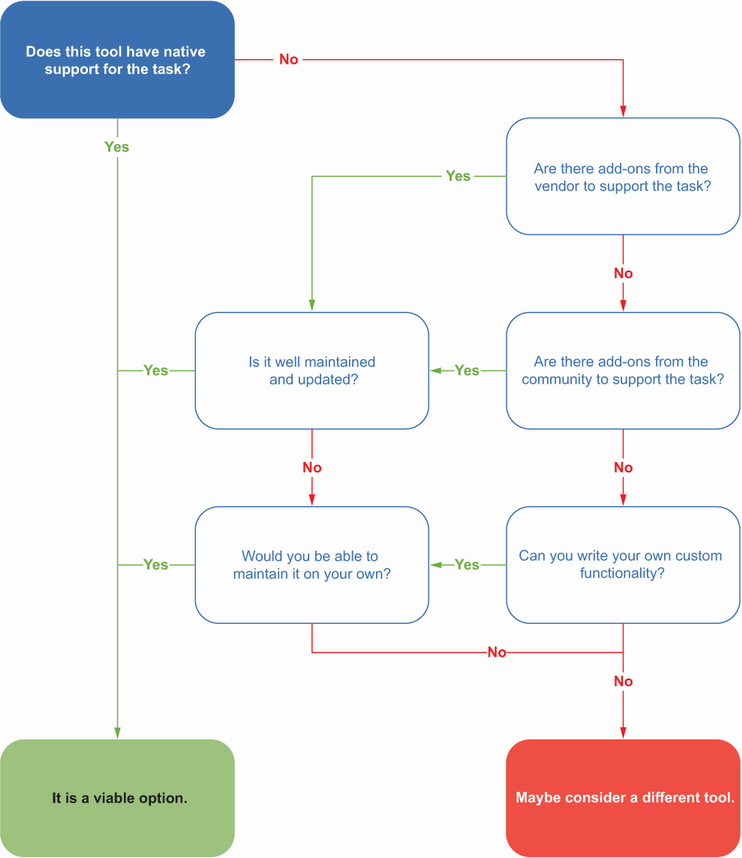
Use the decision tree to decide whether native cmdlets, official modules, community modules, or a different tool best support every action in an automation. section 1.4.1



