Deployment makes a trained machine-learning model available for live use. A practical path starts with a small local web application, then moves to a cloud endpoint when broader access or scalable resources are needed. section 10.1 section 10.4.3
Exercise the trained model with a few genuinely new data points early. This exposes data leakage, clarifies which features will actually be available, and checks whether test-set performance reflects real-world behavior before deployment becomes expensive to change. section 9.5.1
A simple web deployment combines these working parts:
- A saved trained model loaded by a Python Flask server module. section 10.1.1
- A YAML configuration file containing server parameters such as the model directory. section 10.1.1
- An input page for property characteristics and a results page for the prediction, supported by JavaScript and CSS. section 10.1.1
- A cloud endpoint that replaces the local model file as the callable location for predictions. section 10.4.3
From local testing to an endpoint
Run the Flask server locally, open localhost:5000, and test a Kuala Lumpur property prediction. For a cloud test, send the same property features as JSON arrays to a Vertex AI endpoint, then apply the sigmoid function to its output when a probability is required. A sample result reports a 17.9 percent probability that the property exceeds the median price. section 10.1.5 section 10.4.4
Figure 10.1 Overview of the web deployment
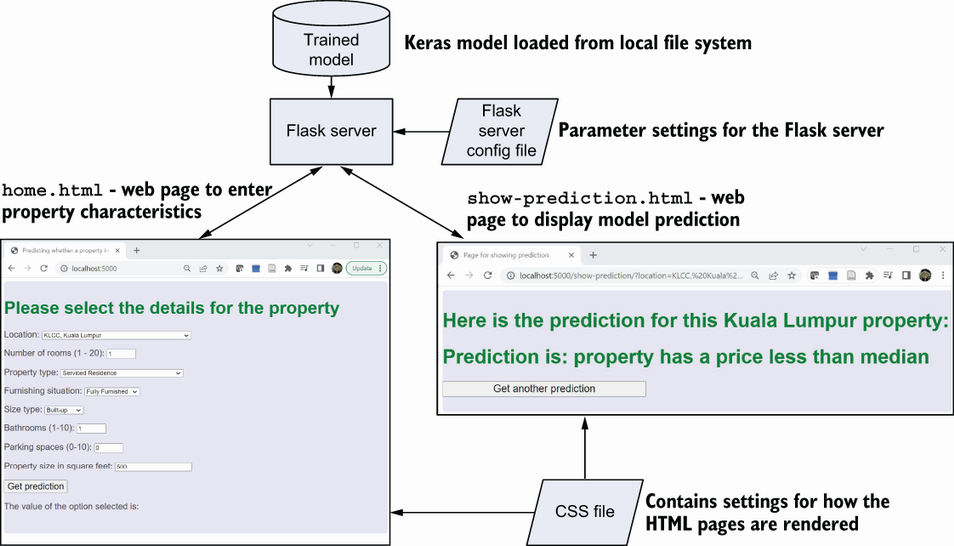
Use the deployment overview to trace the model, Flask server, configuration, web pages, and styling as one working system. section 10.1.1






















