Deployment puts a trained model in an environment where it can receive inputs and return outputs. A common form is an inference service with a REST API; another is a model running on an edge device. A working model is only the starting point: the deployed service must handle its intended workload, preserve the model’s data requirements, and remain maintainable as models change. section 1.3.3 section 2.1.5 section 10.1
Move from a validated model to a reliable release in stages:
- Automate data versioning, training, evaluation, and validation before deployment. A CI trigger can run these steps and deploy the resulting service. section 1.1.2
- Deploy to staging first, evaluate the candidate against the production model, then promote it. Record model versions and lineage so a previous version can be restored. section 2.1.5
- Package the serving environment and test the model in its final form. Optimization for an edge device, for example, can change performance from what GPU-based training suggested. section 2.1.5 section 1.3.3
- Load-test expected traffic and plan for spikes. After release, monitor performance and data drift; a production deployment is not the end of the ML life cycle. section 1.1.2 section 6.0
Figure 1.9 Model deployment consists of the container registry, CI/CD, and automation working in concert to deploy ML services.
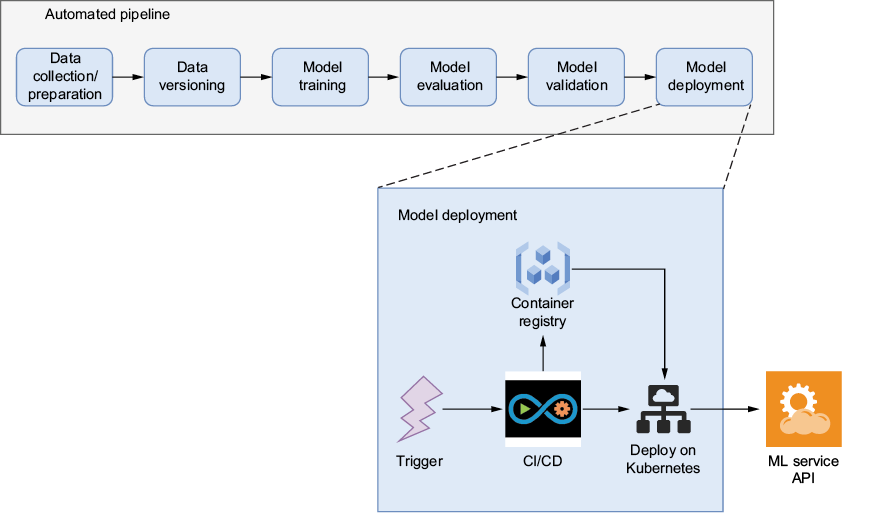
The deployment flow links a CI/CD trigger, a built Docker image in a container registry, and Kubernetes manifests that reference that image. Applying the manifests updates the ML service. section 1.3.3
Serving code is part of deployment, not just a wrapper around a model file. With BentoML, define a Runner and a Service with API endpoints, package the Service as a Bento, and use its health checks, readiness probes, and metrics to operate it. MLflow can retain model tracking and lineage while BentoML handles serving. This gives model developers a way to validate deployments in nonproduction environments without removing the production handoff to deployment engineers. section 10.9 section 10.0
A simpler MLflow-only service
When fine-grained serving options are unnecessary, log and register the model in MLflow, then serve the registered model directly. For a local service, set `MLFLOW_TRACKING_URI=http://mlflow:5000` and run `mlflow models serve -m "models:/recommender_production@prod"`. To build a deployable container, run `mlflow models build-docker -m models:/recommender_production@prod -n recommender_service --enable-mlserver`. The model server exposes `/health` and `/invocations`; choose BentoML alongside MLflow when broader deployment control and monitoring are required. section 10.7
Choose the inference pattern—batch, real-time, or both—before sizing the service. Check preprocessing dependencies, hardware needs, security, logging, and rollback alongside latency and scalability. Monitoring can reveal deterioration after live data arrives and prompt another training-and-deployment cycle. section 10.1 section 1.1.2






















