A metric is a numeric measurement collected from a database node over time. ScyllaDB continuously records hundreds of them, including read latency, commit-log size, cache entries, reads in progress, and compaction activity. A single value becomes useful when it is associated with a time, so changes and trends can be queried rather than guessed. section 11.1.2
Metrics are the raw material of monitoring: Prometheus collects them from database nodes, Alertmanager can notify operators when a metric crosses a configured threshold, and Grafana turns them into dashboards and graphs. This flow makes cluster behavior visible before or during an incident. section 11.1 section 11.0
Figure 11.1 Prometheus pulls metrics from your database nodes, which are used by the downstream components to provide visualizations and alert notifications.
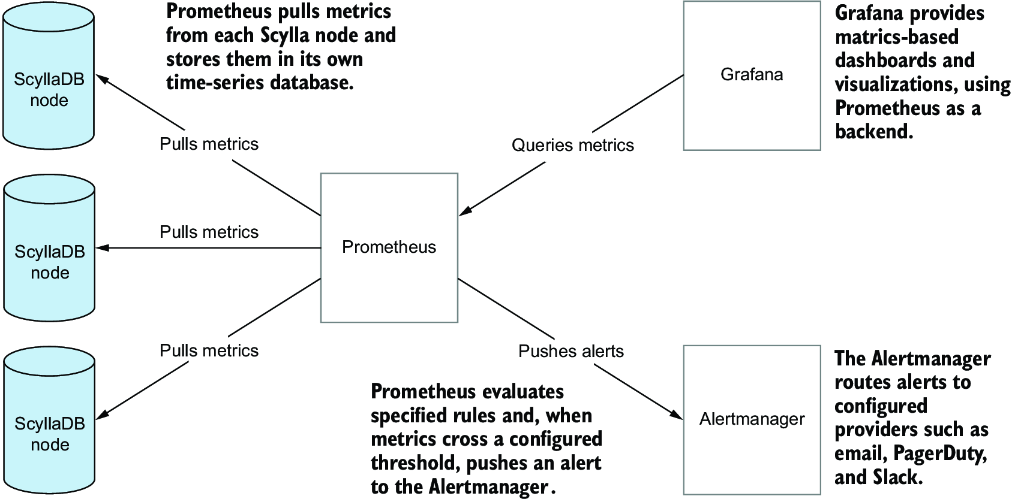
Follow the monitoring flow from node metrics through Prometheus to visualizations and alert notifications. section 11.1
Metrics help answer practical performance questions:
- Use 95th-percentile read latency to assess how slow the worst 5% of reads are from a user's perspective. section 11.1.2
- Compare reads in progress with latency spikes to investigate whether increased query traffic is contributing to slow reads. section 11.1.2
- Compare compaction activity with earlier periods to evaluate whether a change may be affecting latency. section 11.1.2
- Check graph units before interpreting a rate: 800 milli-operations per second is 0.8 operations per second. section 11.1.3
A cache-insertion metric
The counter scylla_cache_partition_insertions reports partitions added to cache and can carry a shard label, giving separate values for individual shards. Prometheus scrapes the /metrics endpoint at configured intervals and stores timestamped measurements for later queries and graphs. section 11.1.2
Scylla exposes metrics by default at port 9180 on the /metrics endpoint. Prometheus can scrape that endpoint every 20 seconds in the supplied monitoring configuration, retain the values in time-series storage, and query or transform them with PromQL. Grafana dashboards then present views ranging from cluster traffic, latency, and availability to reads, writes, compaction, tombstones, operating-system performance, and CQL query volume. section 11.1.2 section 11.1.3















