Symmetry arranges corresponding elements on opposite sides of an axis so the composition carries equal visual weight. In web design, exact mirroring is uncommon because content lengths differ, so the practical goal is an equally distributed, repetitive layout. section 2.1.5
Symmetry makes a page predictable and can establish visual hierarchy before typography, color, or animation are added. It works with proximity, repetition, alignment, contrast, and balance rather than operating alone. section 2.1 section 1.2.1
Apply symmetry without forcing every detail to match:
- Divide a layout into clear, comparable regions when equal visual weight supports the content. section 2.1.5
- Counter a heavier image with whitespace, text, or another element instead of matching content mechanically. section 2.1.5
- Alternate image and text positions across rows to preserve balance while avoiding a rigid repeated arrangement. section 2.1.5
- Check whether unequal regions still balance the whole; asymmetry can be engaging, but uneven weight can leave a page visibly off-balance. section 2.1.5
A balanced landing page
The ENSEMBL landing page uses a clear middle line and two equal-width sections. Although one side contains more text, whitespace offsets the heavier image. Lower sections alternate image and text positions, keeping the composition balanced without requiring perfect mirror images. section 2.1.5
Figure 2.41 This page is split into two equal-width sections, and while the right-hand side has more text, the white space helps counter the full image on the left. (Courtesy of ENSEMBL, https://getensembl.com/)

Use the figure to inspect how equal-width sections and whitespace distribute visual weight. section 2.1.5
Figure 2.42 In this example, symmetry exists even though the layouts alternate each row, keeping items on the page balanced. (Courtesy of ENSEMBL, https://getensembl.com/)
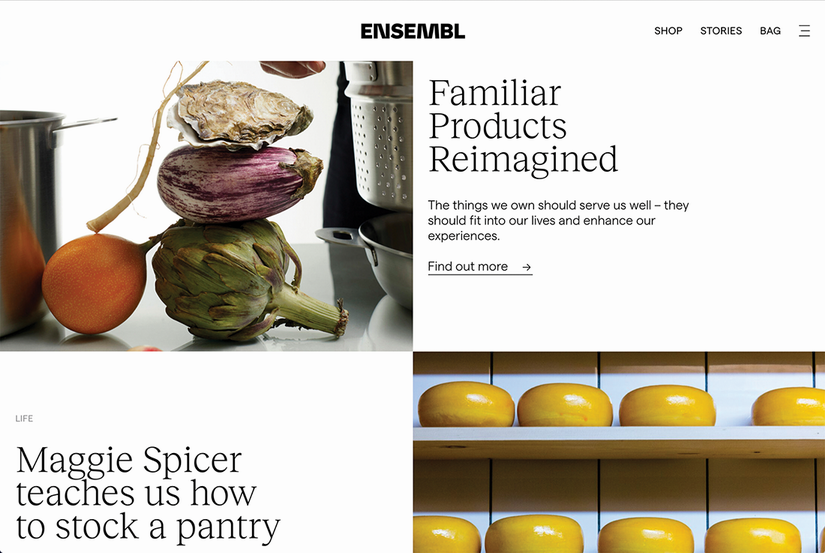
Use the figure to compare alternating rows that preserve symmetry through balanced placement rather than identical composition. section 2.1.5



