A command-line interface (CLI) is a text-based interface through which users or programs invoke commands and interact with software. Platform teams commonly assess it alongside a graphical user interface (GUI), especially when development teams already use terminal-based tools. section 2.3.1
A CLI is particularly valuable for repeatable, programmatic platform operations. Typical commands expose actions such as authentication, repository creation, or other platform API capabilities without requiring a dedicated browser interface. section 2.3.1 section 7.3.2
A useful CLI design makes platform work explicit and automatable:
- Provide focused commands for common platform actions, such as logging in or creating a repository. section 2.3.1
- Support terminal-based authentication when users cannot conveniently control a browser from the calling program. section 7.3.2
- Keep configuration and orchestration automatable rather than making the CLI depend on manual UI changes. section 7.3.2
Team-aware platform access
A platform CLI can initiate an OAuth 2.0 device-authorization flow: the user authenticates through GitHub, an identity provider obtains team membership, and the resulting JSON Web Token grants access to team resources. An implementation exercise uses Auth0 and the example CLI name epectl. section 7.3.2
$> <tool name> login
Use the command examples to see the minimal terminal interaction pattern for CLI authentication and platform operations. section 2.3.1
Figure 7.9 In this authentication and authorization flow, the IDP acts just as a secure go-between. The user must authenticate through GitHub and grant their device authorization to receive a JSON Web Token.
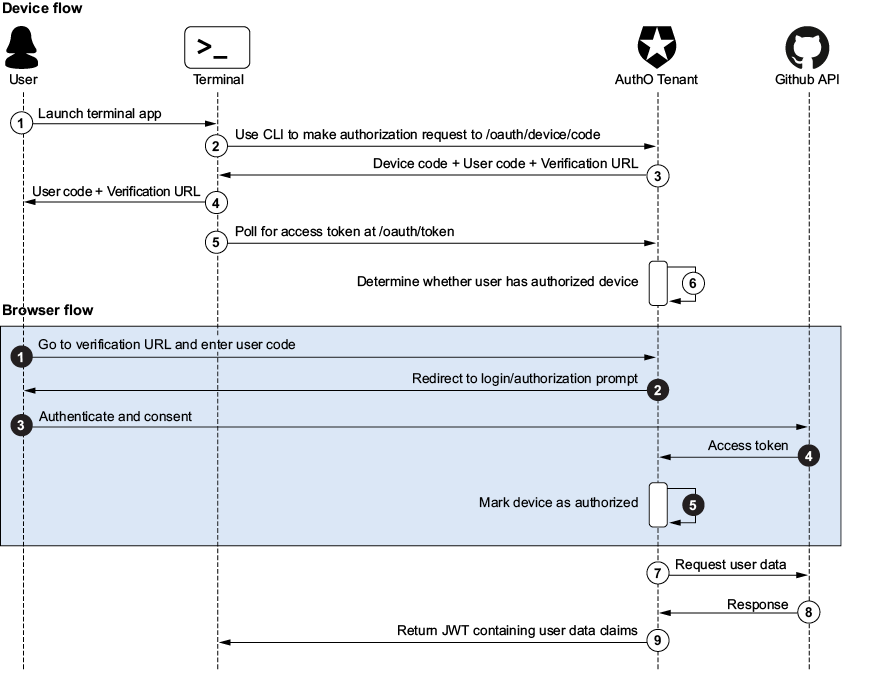
Follow the authentication flow showing the identity provider as a secure intermediary between the terminal user, GitHub, and the issued token. section 7.3.2








