Text summarization turns a document or pasted passage into a shorter account of its important information. In a web application, users can submit a PDF, DOCX file, or text and receive a concise summary; the central challenges are extraction accuracy, limited LLM context, and response time. section 7.1 section 7.1.5
A practical document-to-summary pipeline has four stages:
- Accept an upload or pasted text. A server action routes files through document processing and text directly to summarization. section 7.1.5
- Extract PDF or DOCX content with LangChain.js loaders, then clean the extracted text where necessary. section 7.1.3 section 7.1.4
- Split long content into chunks before sending it to an LLM. A RecursiveCharacterTextSplitter example uses a chunk size of 1,500 and an overlap of 200. section 7.1.3
- Generate and combine summaries, then return the result to the UI as a paragraph or bullet points according to the user's preference. section 7.1.2 section 7.1.3
Figure 7.2 The MapReduce summarization pattern, behind the scenes. The input document is divided into smaller chunks. Each chunk is then processed independently by the map function, generating intermediate summary pairs. These pairs are subsequently organized and are grouped together. The reduce step is then applied to these grouped pairs, aggregating the values to produce a final summary.
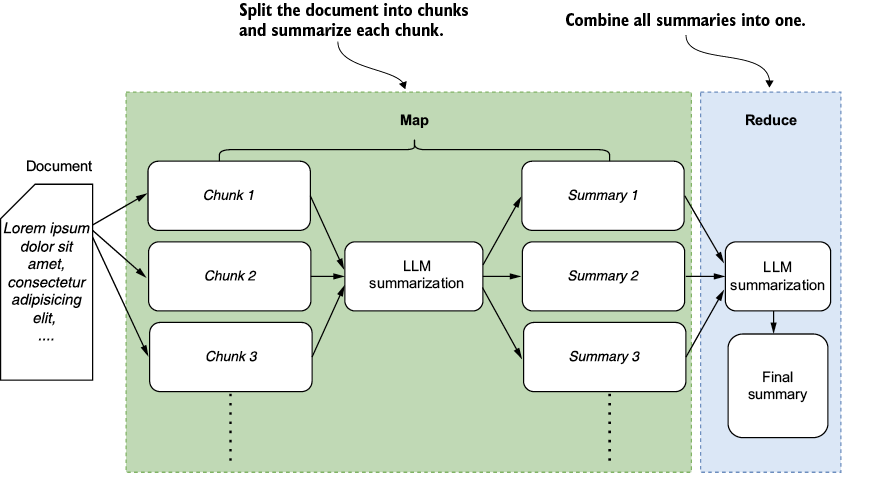
The MapReduce diagram shows why a long document need not fit into one prompt: chunks produce intermediate summaries, which are grouped and reduced to a final summary. section 7.1.2
Summarize prepared document chunks
With an LLM assigned to model and processed chunks assigned to docs, a LangChain.js example calls loadSummarizationChain(model, { type: "map_reduce", verbose: true }), then invokes the chain with { input_documents: docs }. This maps chunk-level work into one returned summary. section 7.1.3
MapReduce is not the only strategy. Refine starts with a summary of the first chunk and updates it as each subsequent chunk arrives. Choose a workflow with the document's size and context needs in mind. section 7.1.2 section 7.3
Check the input before judging the output. PDFs and DOCX files can contain poorly extracted text, tables, footnotes, or images; the illustrated PDF loader does not extract images. Removing irrelevant headers or other noise can help, while token-usage tracking helps expose processing costs. A responsive UI should show that the request is underway and display the summary when ready. section 7.1.4 section 7.1.5











