TLS protects Kafka data in transit by encrypting communication so intercepted data remains unreadable. It can also authenticate communication participants, but encryption alone does not replace authorization, ACLs, network controls, or security policy. section 9.0 section 9.2.3
Configure TLS around certificates, trust decisions, and service roles:
- Generate a private key and keystore for each server or client that participates in TLS communication. section 9.3.2
- Create a certificate signing request, obtain a certificate from a certificate authority, and import it into the keystore. section 9.3.2
- Create a truststore containing trusted server, participant, CA, and intermediate-CA certificates. section 9.3.2
- Configure keystore, truststore, and key-password properties on brokers and clients; Kafka retains the historical SSL prefix for some properties. section 9.3.2
- Require mutual TLS when clients must authenticate themselves with their own keys and certificates. section 9.3.2
Production security review
A production Kafka design may use TLS to protect broker, client, and internal communication, while separately defining authentication methods, ACLs, network reachability, and whether broker-to-controller or legacy ZooKeeper traffic also requires encryption. This prevents the common mistake of treating encrypted communication as the complete security design. section 9.2.3
Figure 9.11 Generating keys and receiving a certificate. The Party (client or server) is the entity that generates the key pair and requests a signed certificate from the certificate authority.
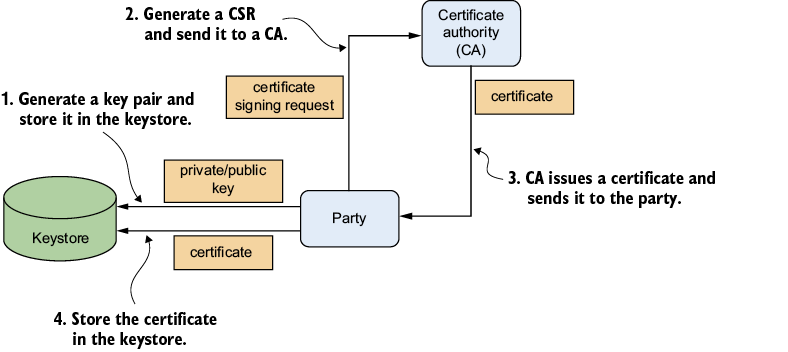
Follow the certificate-generation flow from key-pair creation through certificate-authority signing for either a client or server. section 9.3.2
Listing 9.3 Server configuration for TLS
ssl.keystore.location=/certs/kafka.server.keystore.jks  #1
ssl.keystore.password=secret1  #2
ssl.truststore.location=/certs/kafka.server.truststore.jks  #3
ssl.truststore.password=secret2  #4
ssl.key.password=secret3  #5
ssl.client.auth=required  #6
Inspect a broker configuration showing keystore, truststore, key-password, and required client-authentication settings. section 9.3.2














