liveBook · Manning

Uri

As explained in Build a Website with ChatGPT

A URL is a standardized address that identifies the location of a resource or network endpoint.

A URL is a standardized address that identifies a web page or network endpoint. In HTML, the <a> element uses its href attribute to store the address a browser should open. section 6.2.1

URLs can point to files on the same site or to external pages. A filename can identify a nearby page, while a directory path or complete web address identifies a different location. section 6.2.1

Linking to pages

Use a relative URL for a nearby page: <a href="about.html">About</a>. For a page in the site's root-level faq directory, use <a href="/faq/index.html">FAQ</a>. An external page can use a complete URL: <a href="https://en.wikipedia.org/wiki/Rutabaga">Rutabaga</a>. section 6.2.1

Figure 6.3 The syntax to use for the <a> tag
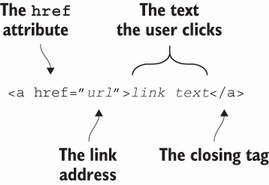
Use the syntax reference to inspect how the <a> tag and href attribute turn a URL into a clickable link. section 6.2.1


How Build a Website with ChatGPT covers it

How deep it goes
Explains URL terminology, relative paths, root directories, and complete addresses, but does not descend into network protocols.
Examples
Shows about.html, /faq/index.html, a Wikipedia address, and a form field that accepts a web address.
What it assumes
Teaches the URL term alongside the HTML a element and href attribute rather than assuming prior link syntax.
What you can do after
Build HTML links with relative, directory-based, or complete URLs and configure forms to accept web addresses.
How it connects
Connects URLs with HTML links, href attributes, directories, and URL form inputs.

Also explained in

Compare how 9 books explain uri →

Related concepts

This explainer was generated by Manning's knowledge graph from the text of Build a Website with ChatGPT. The section links point to the parts of the book it draws on.






