An embedding is a vector—a list of floating-point numbers—that represents features of data such as text, images, or audio. It gives an application a way to compare meaning rather than rely only on matching words. Similarity search can use embeddings to find relevant answers, documents, or recommendations. section 5.4 section 5.4.1
A menu search
Suppose a customer asks for something similar to spaghetti carbonara. Convert the request into a query embedding and compare it with precomputed embeddings for menu items. Nearby items can be ranked as recommendations without requiring the customer to name their ingredients. section 5.4.1
Figure 5.8 The concept of embeddings using a restaurant menu analogy. The “embedding space” represents a multidimensional space where both customer orders (queries) and menu items are mapped as vectors. Each menu item (e.g., spaghetti carbonara) is a precomputed vector, while the customer order is converted to a query vector. Similarity between items is determined by their proximity in this space. Attributes like “pasta” or “creamy” represent dimensions of the embedding space. A similarity search finds the closest match and items similar to the query, mirroring how embedding-based systems in machine learning find relevant results for given inputs.
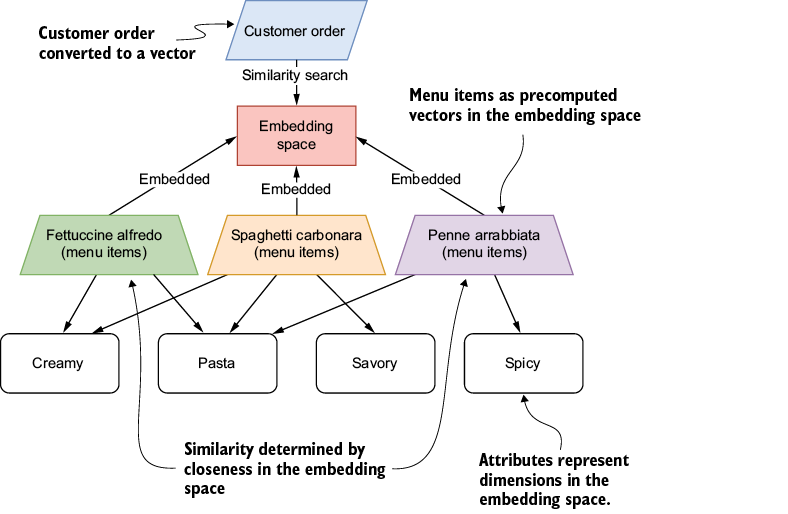
The diagram maps a customer request and menu items into the same embedding space, then shows how proximity identifies similar dishes. section 5.4.1
In JavaScript, the Vercel AI SDK’s `embed` generates an embedding for one value; `embedMany` handles a batch and returns embeddings in input order. Supply an embedding model and text, then use the returned numbers for retrieval—not as an answer to display to the user. section 5.4.2
Listing 5.7 Creating a single embedding
import { embed } from "ai";    #1
import { createGoogleGenerativeAI } from "@ai-sdk/google";

const google = createGoogleGenerativeAI({ apiKey });

const { embedding } = await embed({
  model: google.textEmbeddingModel("text-embedding-004"),    #2
  value: "The quick brown fox jumps over the lazy dog",    #3
});

console.log(embedding);
This runnable listing calls `embed` with Google’s `text-embedding-004` model and logs the resulting vector. section 5.4.2
For an IT support knowledge base:
- Generate embeddings for stored support questions and keep each question associated with its answer. section 5.4.3
- Embed a user’s question with the same model, compare it with the stored vectors using cosine similarity, and select the closest question. section 5.4.3
- Return the answer associated with that question. An in-memory object is enough to demonstrate the flow; stored embeddings support a deployed retrieval system. section 5.4.3 section 5.4.2
Listing 5.11 Performing similarity search on the embeddings
let maxSimilarity = -1;    #1
let mostRelevantQuestion = "";    #2

for (const [question, storedEmbedding] of Object.entries(embeddingDB)) {
  const similarity =
cosineSimilarity(queryEmbedding, storedEmbedding);    #3
  if (similarity > maxSimilarity) {    #4
    maxSimilarity = similarity;
    mostRelevantQuestion = question;
  }
}
The listing shows the comparison loop that scores stored embeddings and retains the best-matching support question. section 5.4.3
For document search, ingest content, generate embeddings, and place them in a vector store so a retriever can find relevant documents or chunks. In retrieval-augmented generation, those results become context for a prompt to a language model. One application stores uploaded-document embeddings in Upstash Vector and searches them when users chat with a knowledge base. section 6.2 section 7.2.2 section 11.1.1
Treat document embedding as part of the upload workload. Server-side parsing and chunking need error handling; for heavier deployments, consider background processing, upload limits, malware scanning, and encrypted storage for retained embeddings. section 11.2.2














































