Vectorization turns text into numerical embeddings that an application can compare. An embedding model maps a query and candidate content into the same vector space; nearby vectors can indicate relevant matches. The numbers are useful not as readable answers, but as inputs to similarity search. section 5.4.1 section 5.4.2
Figure 5.8 The concept of embeddings using a restaurant menu analogy. The “embedding space” represents a multidimensional space where both customer orders (queries) and menu items are mapped as vectors. Each menu item (e.g., spaghetti carbonara) is a precomputed vector, while the customer order is converted to a query vector. Similarity between items is determined by their proximity in this space. Attributes like “pasta” or “creamy” represent dimensions of the embedding space. A similarity search finds the closest match and items similar to the query, mirroring how embedding-based systems in machine learning find relevant results for given inputs.
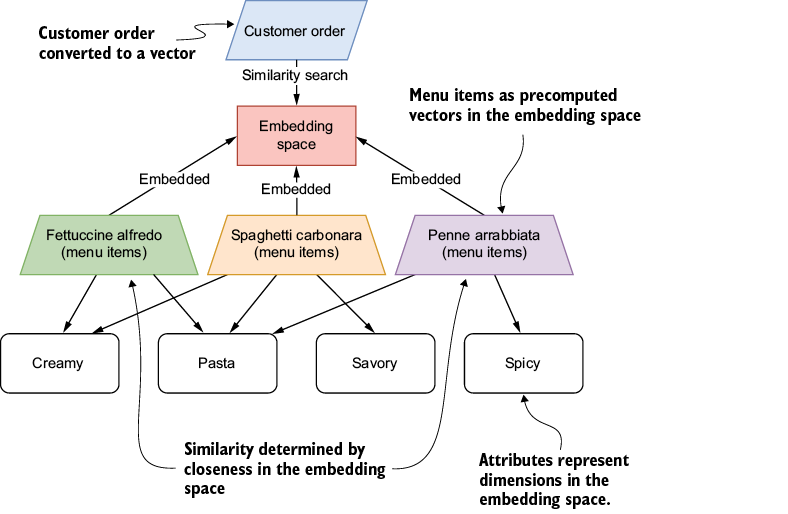
The restaurant-menu diagram shows precomputed item vectors, a newly embedded customer query, and nearby matches in the same space. section 5.4.1
A practical retrieval pipeline separates preparation from each user request:
- Embed content ahead of time and store its vectors with a way to recover the original content. Precomputation avoids repeated model calls and can improve response time and cost. section 5.4.1 section 5.4.3
- Embed each incoming query with the same model, compare its vector with stored vectors, then return the answer associated with the closest match. section 5.4.3
- For document retrieval, split documents into context-preserving chunks, embed them, and retain metadata such as source and page number alongside the vectors. section 7.2.4
IT support question matching
Precompute embeddings for questions such as “How do I reset my password?” When someone asks “I forgot my password,” embed that query, score it against the stored question vectors with cosineSimilarity, and display the answer linked to the highest-scoring question. The small JavaScript example uses an in-memory object rather than a vector database. section 5.4.3
In JavaScript, the Vercel AI SDK’s embed handles one input; embedMany returns vectors for multiple independent strings in input order. A larger retrieval-augmented generation (RAG) application can instead index document chunks with LangChain.js and HNSWLib, save the index to the filesystem, and load it for later semantic retrieval. Keep the embedding model consistent between indexing and queries: a model-version change may produce different vectors for the same input. section 5.4.2 section 7.2.4 section 5.4.1
Listing 7.8 Indexing documents using a vector store
import { HNSWLib } from '@langchain/community/vectorstores/hnswlib';
async indexDocumentsFromDirectory(documentDirectory) {
    const documents = [];

    // Find all PDF files in the directory
    const pdfFiles = fs
      .readdirSync(documentDirectory)
      .filter((file) =>
path.extname(file).toLowerCase() === '.pdf')
      .map((file) =>
path.join(documentDirectory, file));    #1

    // Process each PDF document
    for (const filePath of pdfFiles) {    #2
      const processedDocs = await this.processDocument(filePath);
      documents.push(...processedDocs);
    }

    // Create vector store from processed documents
    const vectorStore =
await HNSWLib.fromDocuments(documents, this.embeddings);    #3

    console.log(`Indexed ${documents.length}
document chunks from ${pdfFiles.length} documents`);

    return vectorStore;
  }
The indexing listing shows PDF files being processed into document chunks and passed with an embedding model to HNSWLib.fromDocuments. section 7.2.4

















