Vectorization converts text or other data into numerical vectors using an embedding model. These vectors let a database retrieve items by similarity rather than exact matches. In semantic search, for example, a query can find relevant content even when matching words are not the basis of the search. section 12.1.2
A vector search workflow has four practical steps:
- Convert the content into embeddings and store them in a vector database. section 12.1.2
- Convert each query into a vector using the same model used for the stored data. section 12.8
- Search for nearby vectors and return their associated results. Cosine similarity and Euclidean distance are ways to compare vectors. section 12.1.2
- For retrieval-augmented generation, retrieve relevant text chunks and add them to the prompt supplied to a language model. section 14.1
Figure 12.2 Vector database operations. Data is processed by an embedding model, transforming it into vector embeddings such as [1.45, ..., 1.01, 0.89, 0.06]. These embeddings are stored in a vector database. Queries from the application are also transformed into embeddings before the database is searched. The most relevant results based on these query embeddings are then retrieved and returned as query results. (Image © MongoDB 2024 CC BY-NC-SA 3.0)
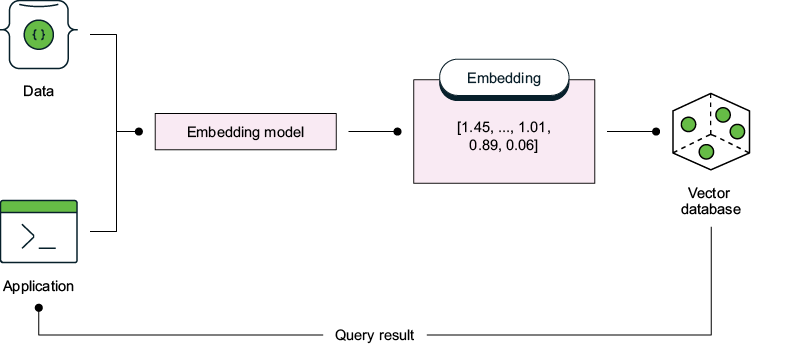
Follow the two paths through the diagram: content and queries are both vectorized before the database compares them and returns results. section 12.1.2
Vector size affects search cost. Atlas Vector Search supports up to 4,096 dimensions, but larger vectors require more comparisons. Consider fewer dimensions only after checking that the embedding-model change does not materially reduce query accuracy. If you change models, create a new index for the new vectors rather than reindexing the existing index during searches. Excluding large vector fields from returned documents can also reduce latency. section 12.7

















