Visual Studio Code (VS Code) is a free, open-source code editor made by Microsoft. Think of it as a word processor built for programming: it helps you read and edit code, spot mistakes, and run commands in the same window. It is a practical place to move from quick terminal experiments to Python applications. section 5.1 section 5.0
Figure 5.1 How VS Code fits into your development workflow. The editor pane (top) is where you write Python code. The terminal pane (bottom) is where you run commands, including Ollama and your Python scripts. Both live in a single window, so you never need to switch applications.
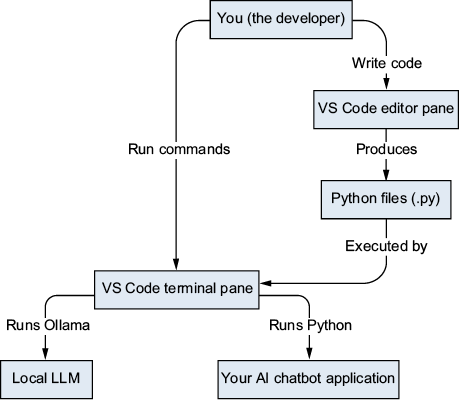
The editor pane holds Python code; the terminal pane runs Python scripts and Ollama commands. Both are visible in one window. section 5.1
A beginner-friendly setup has three parts:
- Install VS Code. On macOS, Homebrew Cask can install graphical desktop applications. section 5.2 section 5.8
- Add the Python extension for syntax highlighting, completions, error detection, and debugging support. section 5.8
- Give each project its own folder. Use the integrated terminal (Ctrl-`) to run commands without leaving the editor; use the command palette (Cmd-Shift-P or Ctrl-Shift-P) to find features. section 5.8
From editing to running
Create a project folder, write a Python script in the editor pane, then run it in the integrated terminal. The same workspace can hold Python files for a local AI application that uses Ollama. section 5.0 section 5.1






