Visual Studio Code (VS Code) is a programming environment for writing, running, and debugging code. It combines a code editor with extensions that support Python and GitHub Copilot, making it approachable for beginners while remaining useful to professional software engineers. section 1.2.1 section 2.2.2
Use the main interface areas to develop and test software:
- Activity Bar: open folders and install extensions. section 2.4
- Side Bar: view files in the selected folder or activity. section 2.4
- Editor Pane: write, edit, copy, paste, or generate code. section 2.4
- Problems and Terminal panels: inspect potential errors, interact with Python, and view program output. section 2.4
A beginner's Python workflow
Install Python, VS Code, and the required extensions, then open a folder and create a Python file in the Editor Pane. Ask Copilot for code, read enough Python to check the suggestion, run it in the Terminal, and inspect Problems or output when something fails. section 2.0 section 2.2.2 section 2.4
Figure 2.1 The VS Code interface [3]
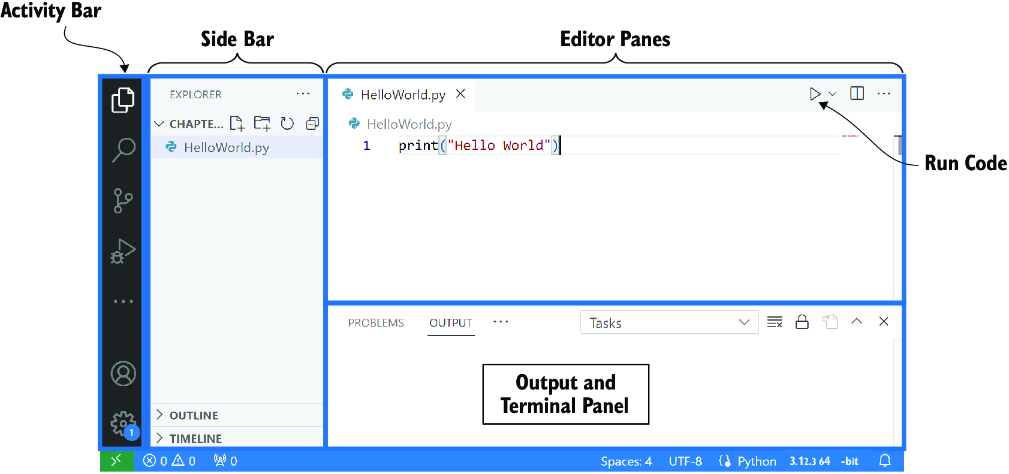
Use the interface diagram to locate the Activity Bar, Side Bar, Editor Pane, and output and terminal areas. section 2.4






