Web search retrieves URLs for a research question so an application can inspect relevant pages and turn their contents into a report. A useful workflow combines query generation, result collection, page scraping, and summarization rather than treating search as an isolated lookup. section 4.1 section 4.3
A practical research-search pipeline proceeds through these stages:
- Rewrite the user question into several focused search queries, using the assistant role and requested query count as prompt inputs. section 4.7.2
- Run each query through a web_search function and retain the query, original question, and returned URLs. section 4.6.4 section 4.7.3
- Flatten grouped results so each record contains one search query and one result URL. section 4.6.4
- Scrape each page, limit extracted text to a configured character count, summarize it, preserve its source URL, and join the summaries. section 4.7.3
Astorga research query
For “What can I see and do in the Spanish town of Astorga?”, generated searches include attractions, history, and cultural sites. Each query returns several URLs, which can then be scraped and summarized into a consolidated research report. section 4.6.4 section 4.7.3
Figure 4.2 Automated research summarization engine. Ask a question, and the engine performs a web search, returns URLs, scrapes and summarizes web pages, and compiles a research report for you.
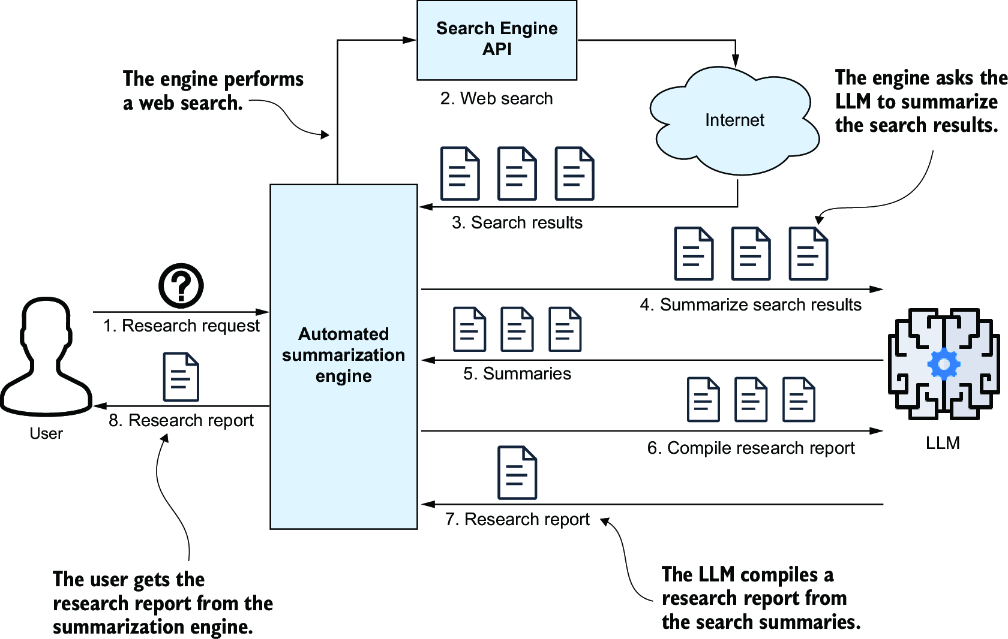
The workflow diagram shows the complete path from a question to search results, scraped pages, page summaries, and a compiled research report. section 4.1




