Code generation turns an OpenAPI description into a strongly typed C# client. The generator reads documented endpoints and schemas, produces client code, and can rerun during builds when the local description changes. section 11.4
Figure 11.6 Visual Studio or a .NET tool downloads the OpenAPI description locally and installs the code-generation tool from NuGet. When your project builds, the generation tool reads the OpenAPI description and generates a C# class for interacting with the API.
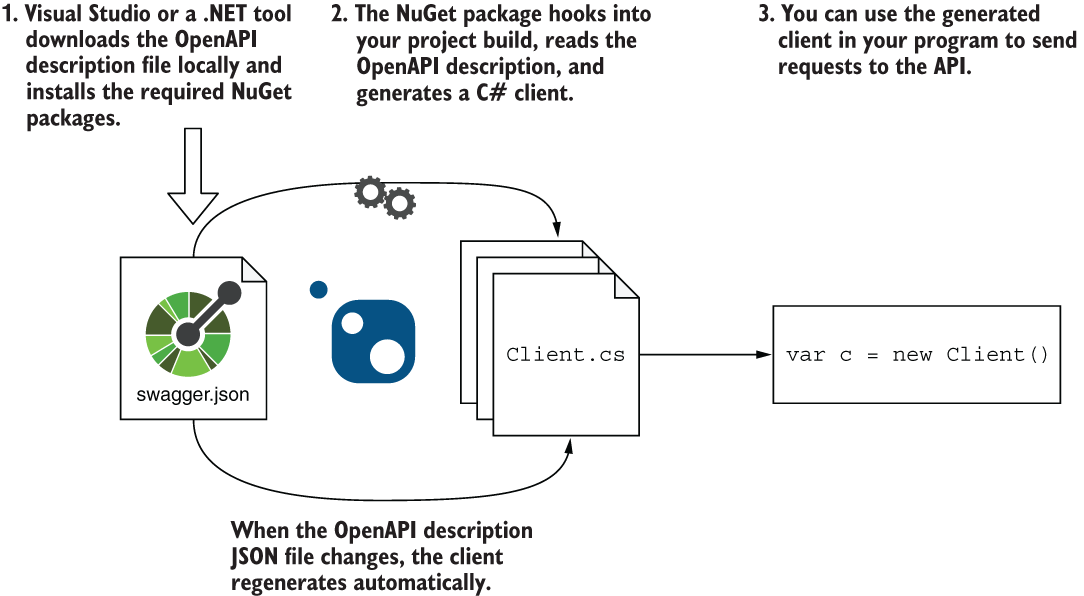
The workflow connects the OpenAPI document, NuGet generator, build process, and generated C# API client. section 11.4
A practical OpenAPI client-generation workflow includes:
- Download the API's OpenAPI JSON document into the consuming project. section 11.4
- Configure an OpenAPI reference with NSwag, a namespace, and a generated client class name. section 11.4.1
- Build the project to generate the client, updating package versions when Visual Studio adds outdated references. section 11.4.1
- Use the generated methods to handle paths, parameters, serialization, deserialization, and error status codes without repeating that boilerplate. section 11.4.3
- Improve generated method names by assigning endpoint names that become OpenAPI OperationIds. section 11.4.3
Calling a generated client
Create a FruitClient with an HttpClient, call FruitPOSTAsync to create a fruit, then call FruitGETAsync to retrieve it. The generated client performs the HTTP details. section 11.4.3
Generation is convenient but opinionated. Exception-based error handling, duplicated types from separate OpenAPI documents, awkward names, and unsupported specification features can make a handwritten client simpler. section 11.6.2 section 11.6.3
















