Code generation uses an AI assistant to produce source code from comments, requirements, partial code, or surrounding project context. It goes beyond ordinary autocomplete: the assistant can draft functions, repeated patterns, scaffolds, and sometimes larger application pieces while you retain responsibility for architecture, correctness, and acceptance. section 1.1.1 section 2.1.2
Treat generated code as a fast first draft, not an authority. Give the assistant a focused task, relevant context, explicit inputs and outputs, constraints, dependencies, and error-handling expectations. Break complex work into smaller components; vague requests invite plausible but unsuitable results. section 1.5.3 section 5.3.2
A practical generation workflow is:
- Describe the smallest useful unit of work in a comment, editor request, or chat prompt. section 2.1.2
- Supply project-specific details such as framework, data, file paths, dependencies, behavior, and constraints. section 1.5.3 section 7.1
- Inspect alternatives, then test the selected implementation immediately rather than assuming it is optimized or validated. section 2.5.2 section 6.3
- Refactor, correct omissions, and reject suggestions when they conflict with maintainability, security, or project conventions. section 5.3.11 section 10.2.2
Generate a CSV-processing draft
For a request such as “Parse data.csv, keep rows whose status is active, calculate the average value, and write output.csv,” an assistant can draft parsing and error-handling code. Review its assumptions, adjust requirements, and run tests against expected and edge-case data before adopting it. section 1.1.1
Improve an underspecified database request
“Connect to a database” provides too little direction for a useful implementation. Naming the target—“Connect to a SQLite database; the file is data/questions.db”—gives the assistant the concrete context needed to propose a more relevant starting point. The resulting query logic still needs inspection and revision. section 5.3.2
Figure 2.5 Copilot can generate entire functions or segments of code based on comments or partial code snippets.
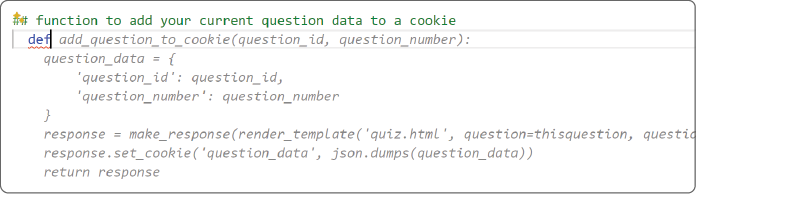
Use the function-generation view to compare how a comment or partial snippet can become a complete proposed implementation before deciding whether to accept it. section 2.1.2
Code generation can also scaffold routes and files, translate code between languages, propose debugging fixes, generate documentation, and support refactoring. These capabilities accelerate routine work, but code may be syntactically valid while violating domain rules, conventions, or portability needs. Keep human judgment in the loop. section 1.8.2 section 2.1.2 section 1.10
















