liveBook · Manning

Data aggregation

As explained in Everyday Data Visualization

Aggregation is the process of combining multiple data values into summarized results such as totals, counts, or maximums.

Data aggregation combines detailed rows into summarized results. Before aggregating, identify the table’s grain: what one row represents. A transaction table, daily banking table, and account snapshot answer different questions because each has a different granularity. section 3.5.1

Use aggregation without losing track of what the numbers mean:

  • Start with granular data when possible; detailed rows can be aggregated later, while summarized data cannot easily reconstruct the details. section 3.6
  • Check the grain before combining tables or interpreting results, because duplicated rows or mismatched granularity can send a visualization sideways. section 3.5.1
  • Match the aggregation to the question and chart: aggregated discrete data often suits bar charts, while continuous data often suits line charts. section 3.6

From individual fruits to a comparison

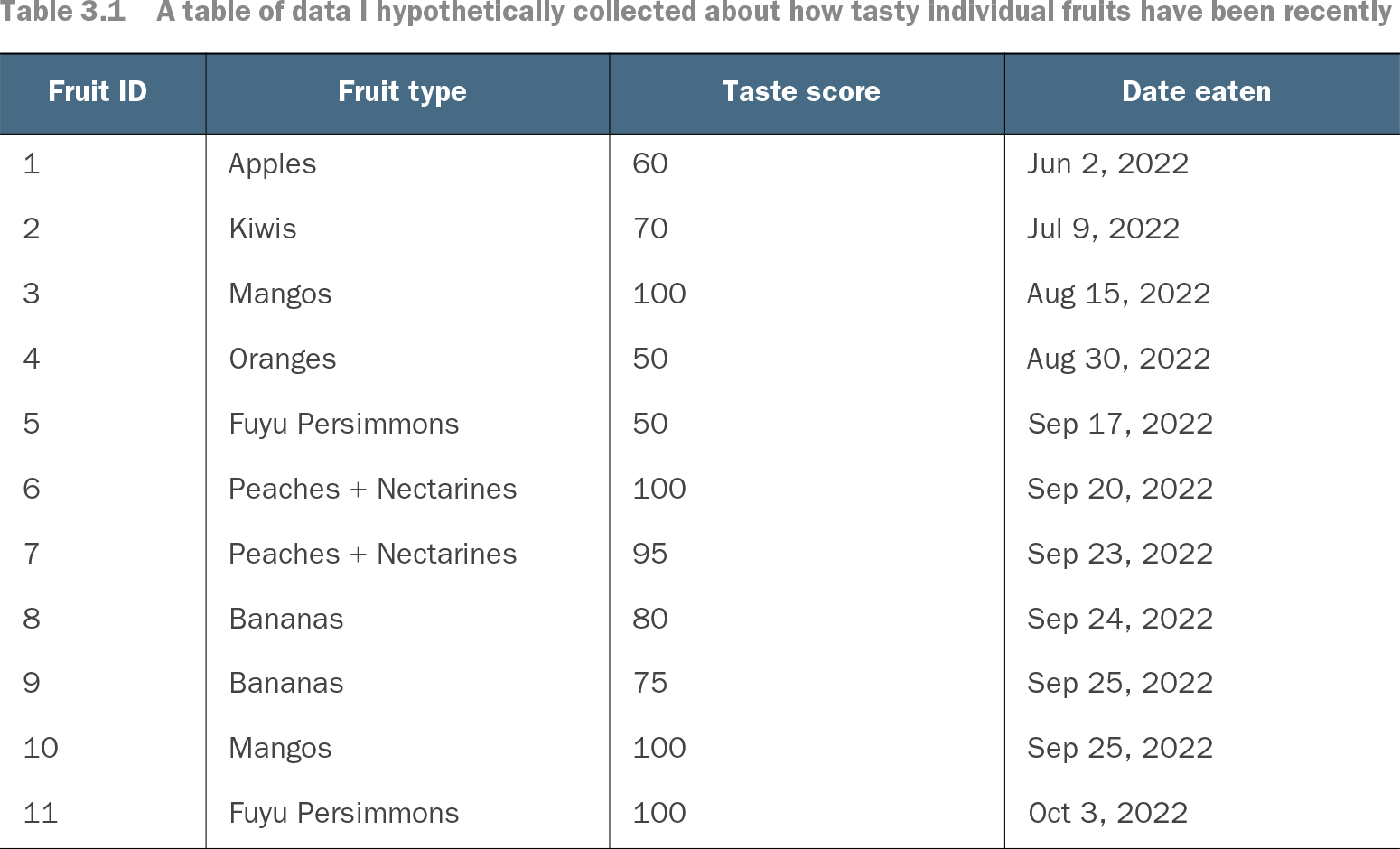
A detailed fruit table records each fruit type, taste score, and date eaten. Aggregating those rows produces one summarized taste score per fruit type, creating a compact table that can power a bar chart. The summary is useful precisely because its grain has changed from individual observations to fruit categories. section 3.5.1

Table 3.1 A table of data I hypothetically collected about how tasty individual fruits have been recently (view table figure)

Fruit ID

Fruit type

Taste score

Date eaten

1

Apples

60

Jun 2, 2022

2

Kiwis

70

Jul 9, 2022

3

Mangos

100

Aug 15, 2022

4

Oranges

50

Aug 30, 2022

5

Fuyu Persimmons

50

Sep 17, 2022

6

Peaches + Nectarines

100

Sep 20, 2022

7

Peaches + Nectarines

95

Sep 23, 2022

8

Bananas

80

Sep 24, 2022

9

Bananas

75

Sep 25, 2022

10

Mangos

100

Sep 25, 2022

11

Fuyu Persimmons

100

Oct 3, 2022

Inspect the individual fruit records before aggregation; the repeated fruit types make the change in grain visible. section 3.5.1


How Everyday Data Visualization covers it

How deep it goes
Explains table grain, granularity changes, and practical risks but stops short of showing SQL aggregation syntax.
Examples
Uses banking transactions, daily spending summaries, account snapshots, and fruit taste records as aggregation examples.
What it assumes
Assumes familiarity with rows and columns while teaching grain, granularity, dimensions, and measures through concrete tables.
What you can do after
Apply it via SQL or a BI tool to summarize tabular data while preserving awareness of its grain.
How it connects
Links aggregation to tabular data, SQL, grain, dimensions, measures, and chart selection.

Also explained in

Compare how 19 books explain data aggregation →

Related concepts

This explainer was generated by Manning's knowledge graph from the text of Everyday Data Visualization. The section links point to the parts of the book it draws on.