Data aggregation turns many detailed records into a smaller set of useful summaries. For customer data, the useful question is not every individual purchase, but a profile for each customer: how much they spent, their latest purchase, and the personal details needed to tailor a message. section 7.2
Think of aggregation as making one compact customer card from a purchase history. Customer master data supplies identity details such as name, age, and city; transaction history supplies products, dates, and amounts. Joining these tables creates the detailed view, while aggregation reduces repeated transaction rows to one row per customer. section 7.2
A practical aggregation workflow has four stages:
- Load customer master data and transaction history into tables. section 7.2
- Join the tables using CustomerID so each transaction is associated with its customer. section 7.2
- Sort records when an aggregate depends on order, such as identifying a last value. section 7.2
- Group records at the needed granularity and select an aggregation method for each target column. section 7.2
The grouping field defines the level of the result. Grouping by CustomerID produces customer-level summaries. Within each group, a sum can combine purchase amounts, while a last-value aggregation can retain the latest relevant purchase information after records have been ordered. The result is structured data that can be passed onward instead of a long transaction list. section 7.2 section 7.4
Figure 7.18 By defining groups, you decide the granularity of your GroupBy aggregation.
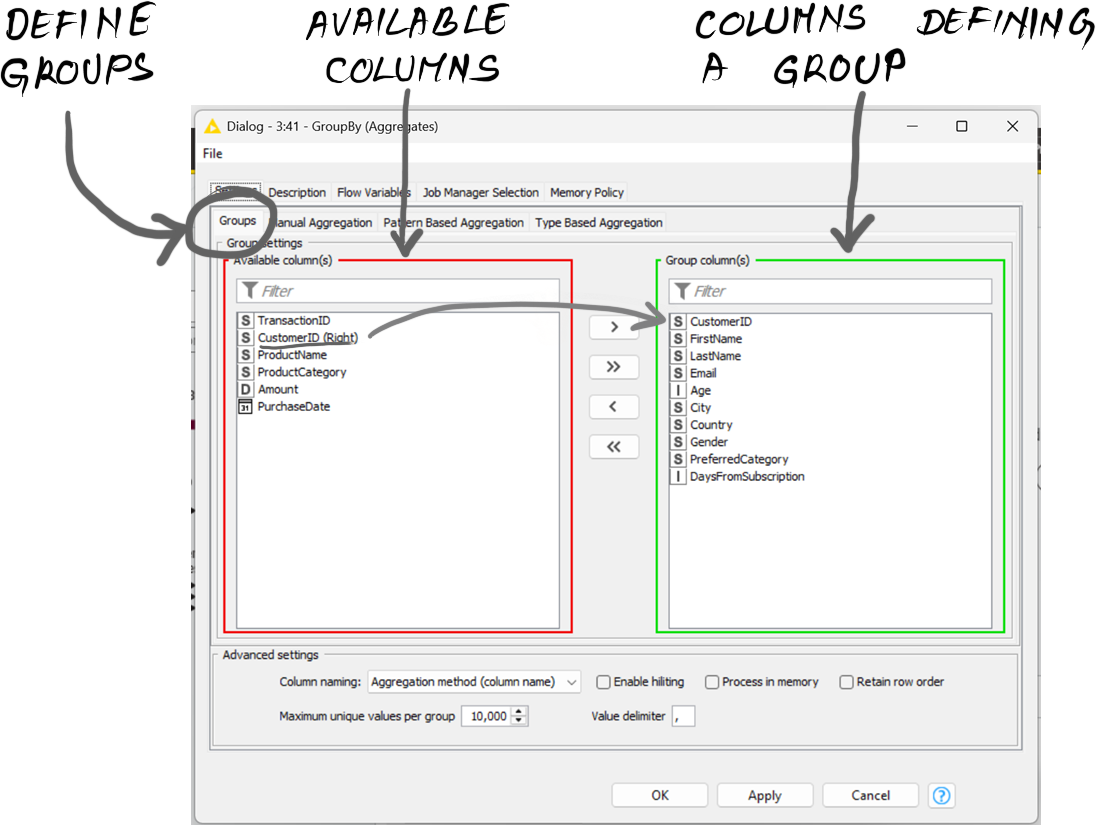
Use the grouping view to see how the chosen group columns determine whether results describe individual customers or a different level of detail. section 7.2
Customer summaries for personalized email
A marketing workflow combines customer records with transaction history, aggregates spending and latest-purchase details for each customer, and turns the resulting customer description into structured input for generative email creation. The generated subject lines and email bodies can then be collected into an Excel file for mail merge. section 7.2 section 7.4
Aggregation is a preparation step, not the whole application. In a visual workflow, it sits beside extraction, joining, sorting, transformation, and integration steps. Its role is to make source data concise and organized enough for downstream systems, including LLM-driven generation, to use reliably. section 7.4


















