Debugging is a systematic, investigative process for identifying, analyzing, and correcting unexpected behavior in AI-enabled Next.js applications. It accounts for server-side processing, streaming responses, state management, rendering, performance, SDK behavior, and changing dependencies. section 8.0 section 8.1
A practical debugging workflow includes:
- Classify the symptom as a rendering, state-management, or performance problem. section 8.1
- Trace errors and responses, then inspect token limits, API errors, rate limits, and model fallback behavior. section 8.2
- Reproduce failures with controlled mocks, simulate error conditions, and verify asynchronous and streaming behavior. section 8.5
- Test components in isolation, then test AI chains and workflows together against realistic usage scenarios. section 8.5
Figure 8.1 The three main categories of Next.js problems (rendering, state management, and performance) and their corresponding debugging strategies. Each branch shows specific diagnostic steps and tools, ultimately leading to a test solution phase.
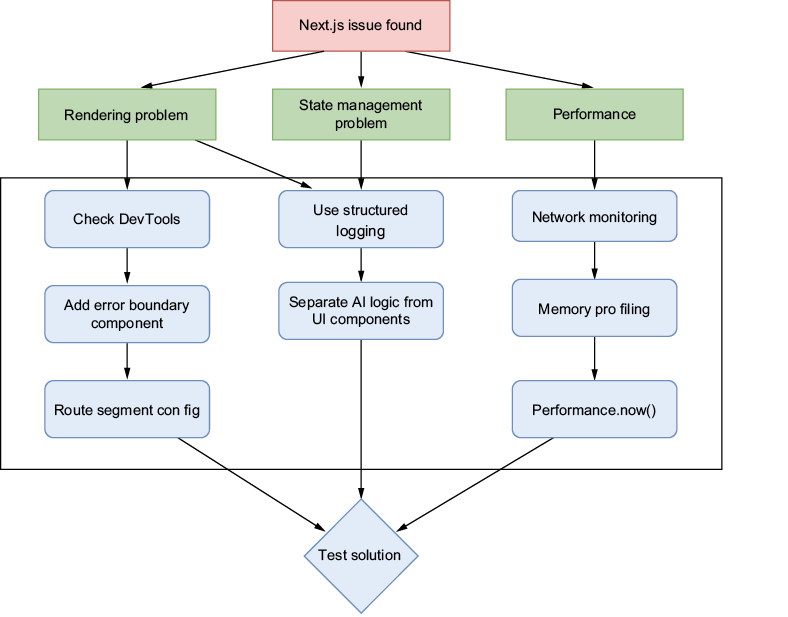
Use the diagnostic map to connect rendering, state management, and performance symptoms with investigation steps, tools, and a final test solution. section 8.1
Figure 8.5 Troubleshooting strategies for Vercel AI SDK problems. There are two main paths: error states/responses and token limits/API errors. Each path shows specific steps for resolution, including implementing error handling, rate limiting, model fallbacks, and token management.
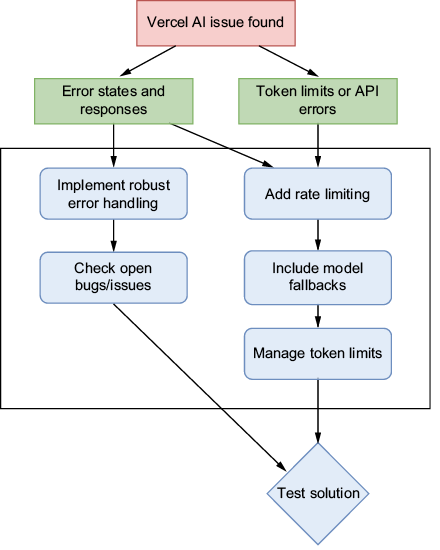
Use the troubleshooting map to investigate Vercel AI SDK error states, responses, token limits, and API failures through handling, rate limiting, fallbacks, and token management. section 8.2















