Debugging locates and corrects software defects. AI assistants can accelerate the first pass: provide the relevant code and error message, then use the response to identify likely failure points, add diagnostic output, or generate tests. Treat suggestions as leads, not verdicts. section 1.8.4 section 2.1.2
Use an AI-assisted debugging loop that preserves developer control:
- Give the tool the failing code and the exact error for targeted help. section 1.8.4 section 6.1
- Inspect proposed edits in a diff rather than pasting unfamiliar code wholesale. section 6.1
- Apply changes incrementally and test after each change. section 6.1
- Refine the prompt or investigate further when a fix repeats the failure or only treats a symptom. section 6.1
Tracing a repeated SQLite constraint error
A session-creation workflow raises a UNIQUE constraint error after a page refresh. A proposed fix correctly advances the session ID, but the error persists. Inspecting the insertion loop reveals the real issue: one question_set_id is reused for all 35 question rows. The next step is to change the insert strategy, test the result, and verify that each session receives its expected questions. section 6.1
Figure 6.8 The diff view of the proposed changes showing exactly which lines of code need to be modified to implement Tabnine’s suggestions
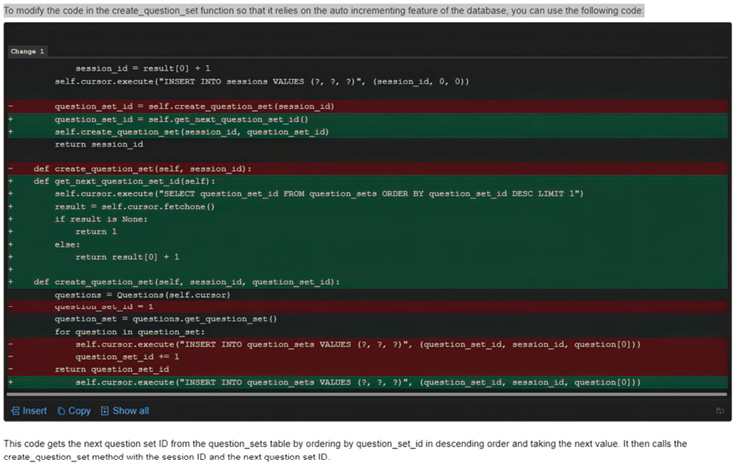
Use the diff view to see exactly which lines an AI-proposed fix changes before accepting or adapting it. section 6.1















