Debugging locates, diagnoses, and corrects software defects. Work through problems during development, preferably bit by bit, rather than waiting until delivery. section 13.0 section 13.2
Use progressively closer inspection to find and understand a defect:
- Read the complete traceback, especially the exception, method name, and line number, to locate the first useful failure point. section 13.1
- Set a breakpoint and run the program interactively, stepping through operations line by line instead of relying only on a crashing exception. section 13.2
- Inspect pertinent values with the debugger's p command, or call locals() to view the function's complete local namespace. section 13.2.4
- Prefer named functions over assigned lambda functions when errors need clear locations; named functions produce more informative traceback names. section 7.1.3
Locate an attribute error
Calling task.update_urgency(4) raises AttributeError because the method calls update_db(), while the class defines _update_db(). The traceback identifies update_urgency and its failing line, narrowing the correction. section 13.1
Figure 13.4 The general aspects of debugging programs in Python. For a program, we add breakpoints to the places where we debug. When the execution encounters the breakpoint, it activates the interactive debugger. Then we can perform a variety of debugging tasks, such as running code line by line.
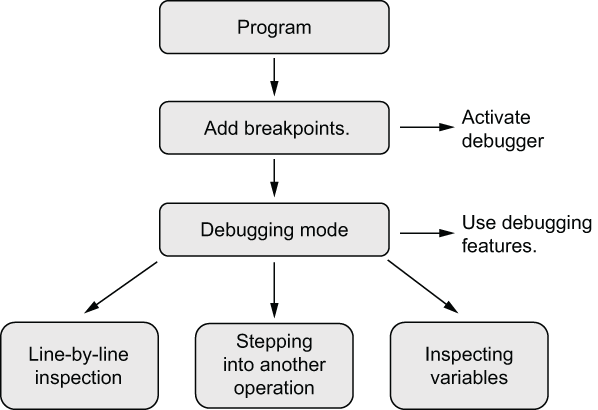
Follow the breakpoint workflow: pause execution, activate the interactive debugger, and run code line by line. section 13.2















