A feature map is a grid showing where a filter detects a particular pattern in an image. Think of it as a new image that highlights one feature: each position holds a number indicating how strongly the filter matches that part of the input. The grid keeps locations meaningful—a detection near the input’s top-left appears near the output’s top-left. section 12.14
To make one, slide a filter across the image. At each position, multiply its numbers by the pixels underneath and add the products. A strong match gives a large value; a blank patch gives a value near zero. Padding—usually a border of zeros—lets the filter reach edge pixels and can keep the output the same height and width. section 12.14
Eight maps from one small image
Start with an 8×8 noisy image and eight different 3×3 filters. Give the image a one-pixel border of zero padding. For each filter, scan all 64 image positions, calculate the patch’s dot product, and add that filter’s bias. Each filter produces one 8×8 map, so the eight maps together form an 8×8×8 collection. Subsequent processing normalizes the maps before applying an activation function. section 12.17
Figure 12.30 The first pixel of all feature maps produced by the first convolutional layer
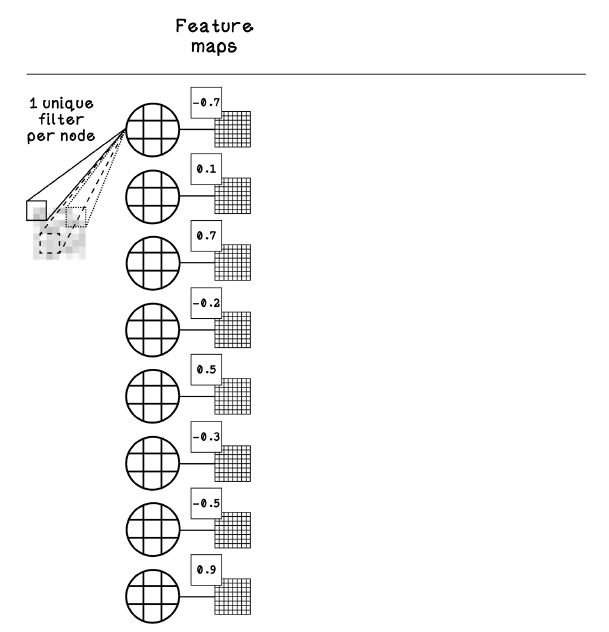
Compare the first pixel across the eight feature maps to see how different filters produce different values at the same image location. section 12.17
Feature maps also carry information between stages of a U-Net. Its encoder shrinks them to capture broader image context, but shrinking loses some precise location information. Its decoder enlarges low-resolution maps with transposed convolutions. Skip connections bring earlier, high-resolution maps into the decoder so it can combine broad context with fine spatial detail. section 12.15 section 12.19
12.42 How skip-connection feature maps are combined with the upsampled feature maps
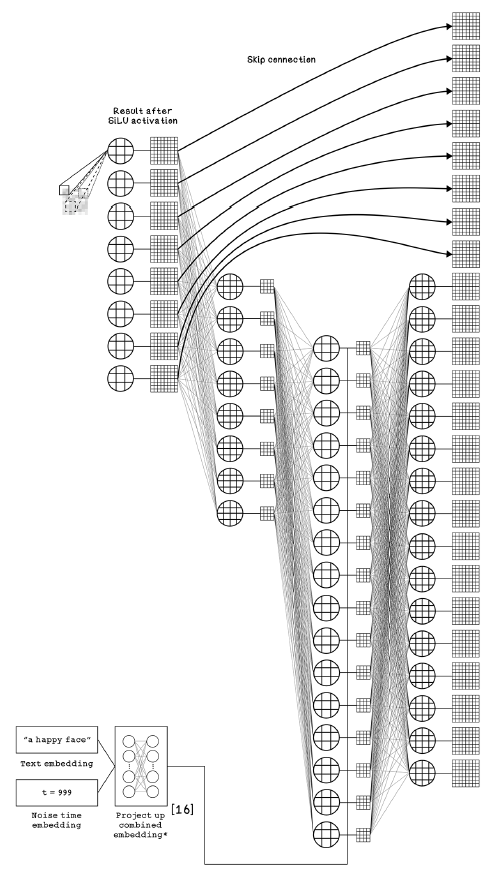
See how high-resolution maps from a skip connection are combined with upsampled maps during reconstruction. section 12.19







