Filtering narrows results or profiles by removing items that match a condition. In PerfView, it removes a matched stack frame and everything below it; in LINQ, it selects collection elements for an API response. section 10.3.3 section 3.1.1
Distinguish filtering from nearby operations:
- PerfView filtering removes the uninterested frame and all work beneath it. section 10.3.3
- Folding skips a matched frame but preserves frames below it in the stack trace. section 10.3.3
- Grouping combines linked stack frames into one group, reducing repeated noise without removing the represented work. section 10.3.3
- LINQ filtering applies optional predicates such as a name substring or text direction before sorting and paging results. section 3.1.1
Filtering an ASP.NET Core font endpoint
A collection endpoint can accept optional name and direction parameters, then retain fonts whose names contain the requested text and whose direction matches. The query can subsequently apply ascending or descending name ordering, Skip, and Take for paging. section 3.1.1
Figure 10.3 PerfView has powerful grouping and folding capabilities that can reduce noise in profiles by grouping or folding frames that you don’t care about.
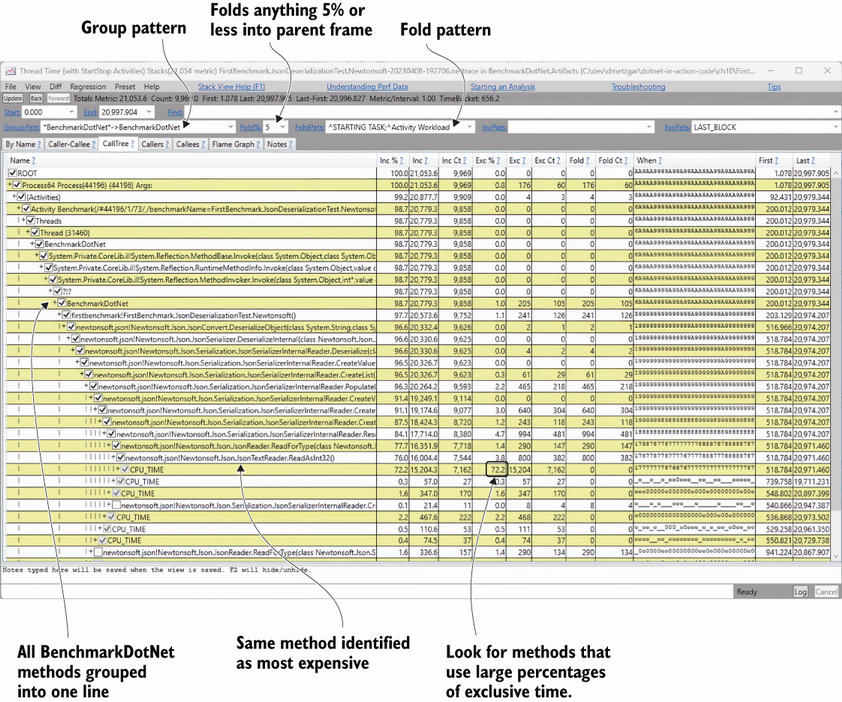
Use the PerfView figure to see how grouping and folding reduce profile noise around frames that are not useful to the investigation. section 10.3.3
































