Filtering narrows a visualization to the values that matter for a current question. It is most useful after people have seen the overall picture: first orient them, then let them remove distracting information, then offer details about what remains. That sequence keeps a large dashboard from feeling like a closet emptied onto the floor. section 7.2.1
A filter is not just a control bolted onto a dashboard. It changes the data people believe they are seeing, so its available choices must make sense after every selection. In a hierarchy such as family, genus, and species, selecting a species while still displaying unrelated families can look like bad data rather than a quirky interface. section 7.1.4
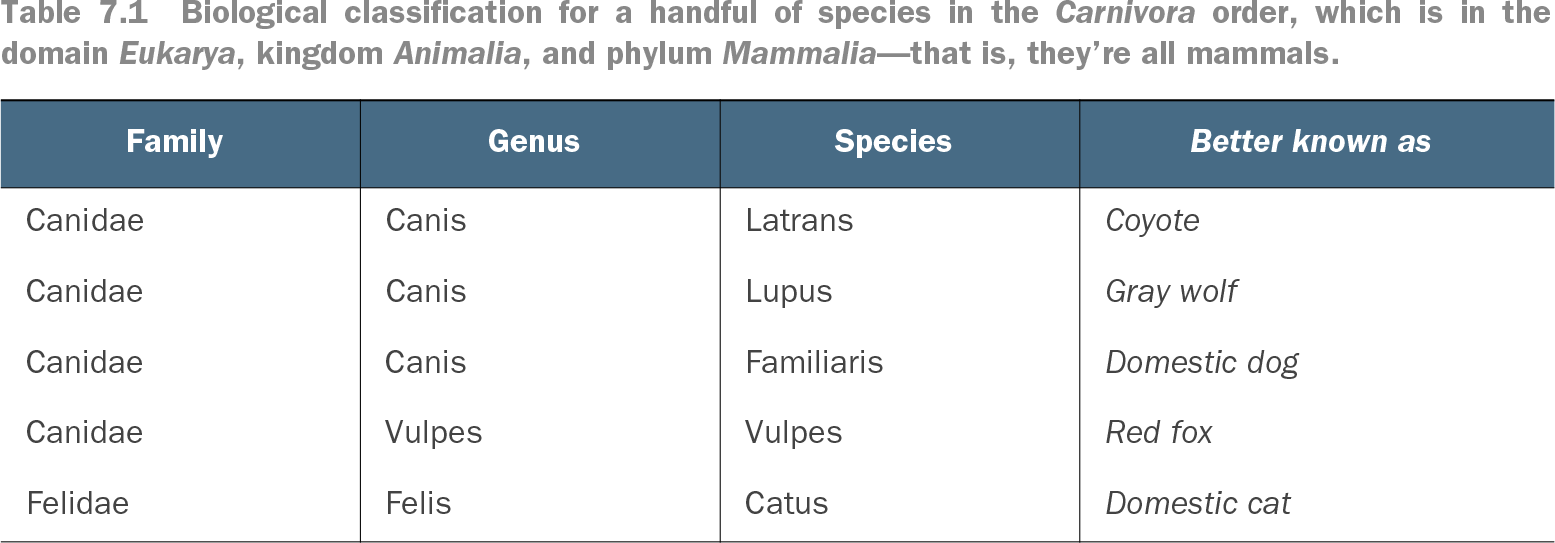
Table 7.1 Biological classification for a handful of species in the Carnivora order, which is in the domain Eukarya, kingdom Animalia, and phylum Mammalia—that is, they’re all mammals. (view table figure)
Use this hierarchy to see why dependent filters should show only values still possible under the current selection. A chosen species should not leave unrelated families looking available. section 7.1.4
Design filters as helpful guard rails rather than opportunities for users to get lost:
- Show relevant values in related filters. If a choice has no data under the current selection, do not leave it posing as a meaningful option. section 7.1.4
- Follow interaction patterns users already know, including familiar locations for filters and controls. Novelty is rarely worth a steep learning curve. section 7.1.2
- Let selections coordinate views when that supports the question. For example, selecting a bar segment can filter associated line, donut, and bar charts to that segment. section 7.1.2
- Provide obvious ways to undo one change and clear all filters. A reset gives people permission to explore without fearing a blank-screen corner. section 7.1.6
- Place filters and controls where readers can find them without competing with the main content; a common starting arrangement puts them to the right of the title. section 8.3.3
Filtering a drought-risk dashboard
A detailed dashboard can begin with all census-block risk data in a scatterplot, then let a person choose a risk factor from a drop-down, filter toward the focus of an investigation, and select a community for a map-based detail view. Filtering does not replace the overview; it turns that overview into a route toward a specific question. section 7.2.1
Document filter behavior alongside metrics and data sources. State whether controls show only relevant values or every possible database value, and explain the choice. This helps both dashboard users and future maintainers understand what a filtered view does—and why. section 8.4.4