An MCP client is an application component that connects to an MCP server, discovers the capabilities it exposes, and uses them. It can be an agent, an LLM application, Claude Desktop, or VS Code. MCP works like USB-C for AI systems: one standardized connection replaces separate connectors for each service. section 3.1.2 section 3.6
Use this three-layer model to separate responsibilities:
- Client: connects to the server, discovers available capabilities, and consumes them. section 3.1.2
- Server: handles client requests and exposes tools, resources, and prompts through JSON-RPC 2.0. section 3.1.2 section 3.1.3
- Service: provides the underlying capability, such as file operations, database queries, web searches, or another agent. section 3.1.2
A client discovering tools
An agent connects to an MCP server and uses discovery, such as list_tools, to identify available actions. The agent can then invoke a tool for an external task, while the same server may also expose resources or prompts. Tools are typically agent-controlled; resources and prompts are commonly selected by the user or application. section 3.1.3
Figure 3.4 The basic components of MCP architecture are clients, servers, and services. Here, you can see some common clients (agents, LLM applications, Claude Desktop, and VS Code) and potential services (file operations, database queries, web APIs, and other agents) that the clients might connect to.
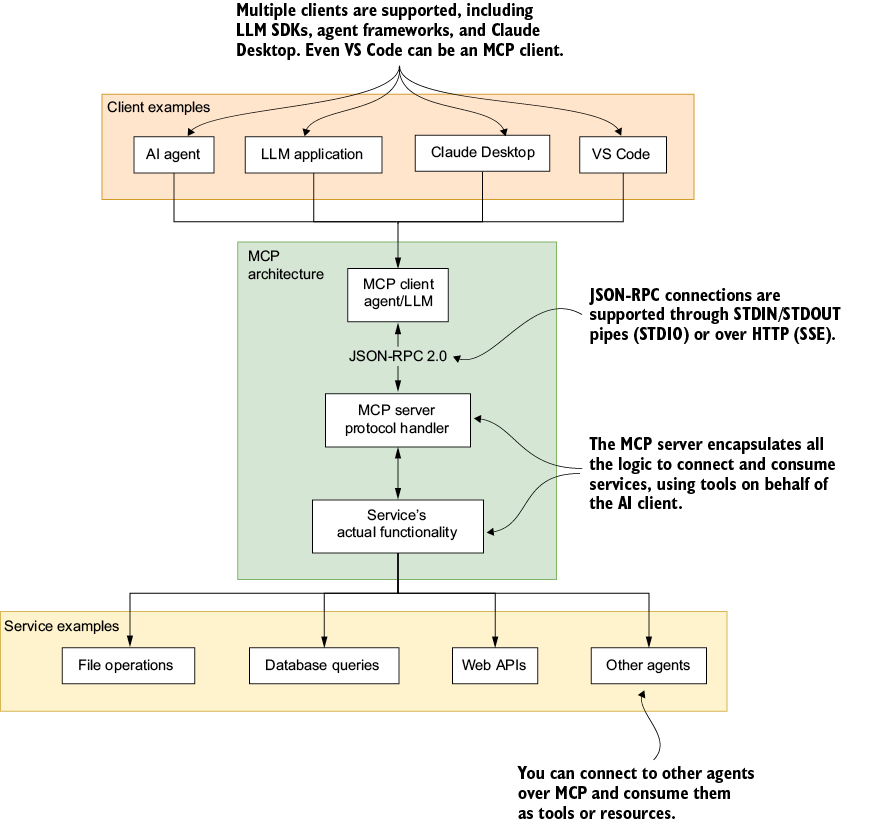
Use the architecture diagram to trace the connection from common clients through MCP servers to services such as filesystems, databases, web APIs, and other agents. section 3.1.2







