An MCP client is an application component that connects to an MCP server, discovers its tools, adds them to prompt context, and invokes them for an LLM. In Spring AI, it turns reusable server capabilities—such as filesystem or database access—into tools available to a conversational application. section 7.1
Build a client incrementally:
- Add Spring Web, an LLM integration such as OpenAI, and the Spring AI MCP Client dependency to a Spring Boot project. section 7.2
- Configure an MCP server with Spring properties or Claude Desktop-compatible JSON; STDIO configuration identifies the command and arguments that launch the server. section 7.2
- Inject ToolCallbackProvider into a ChatClient, register its callbacks as default tools, and expose an endpoint that forwards user questions to the model. section 7.2
- For HTTP+SSE, configure a server URL under spring.ai.mcp.client.sse.connections; this enables independently deployed client and server applications. section 7.4.3
Filesystem questions through /ask
A configured Filesystem MCP Server lets an MCP-enabled controller answer requests such as listing files, creating penguins.txt with generated content, and reading that file back. section 7.2
Figure 7.1 Interactions between MCP Servers and MCP Clients
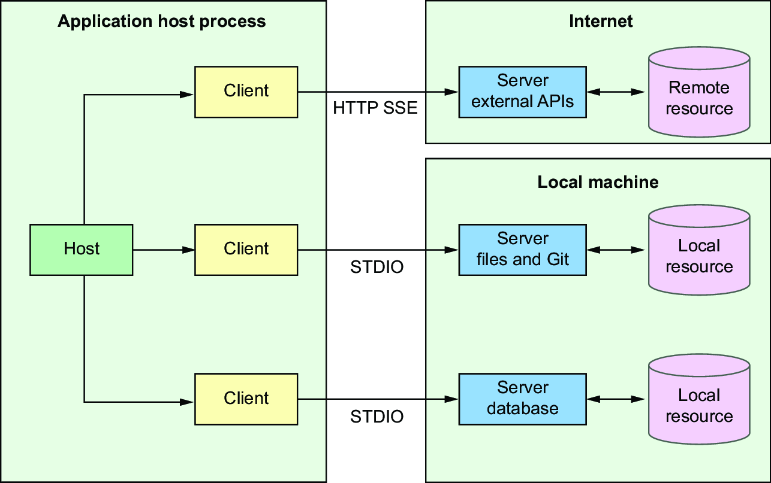
Use the interaction diagram to trace how the client obtains server tools, places them in prompt context, and invokes them for the LLM. section 7.1







