An MCP client connects an artificial intelligence model or tool to MCP servers, allowing it to request selected data and invoke server-defined tools. The arrangement gives agents access to application state and external services through a shared interface rather than separate custom integrations. section 8.14
MCP servers expose sources such as files, database records, logs, multimedia, or internal application programming interface outputs through defined functions. They may also publish prompt templates and executable tools, while the client connects these capabilities to the model’s interaction with the user. section 8.14
The approach offers interoperability but depends on prepared services:
- Standardization reduces duplicated effort and makes integrations more consistent across systems. section 8.14
- Clients remain limited to services that implement MCP servers, tools, and prompts. section 8.15
- GUI-native agents offer a contrasting route by reading screens and clicking or typing without a new MCP integration. section 8.15
Querying cloud-security logs
A security worker could ask an MCP-connected language model to investigate cloud-provider logs in Splunk. A Splunk MCP server might expose a query tool, enabling the client to retrieve relevant records without the worker directly operating Splunk. section 8.14
Figure 8.10 An illustration of the interaction between MCP servers and clients
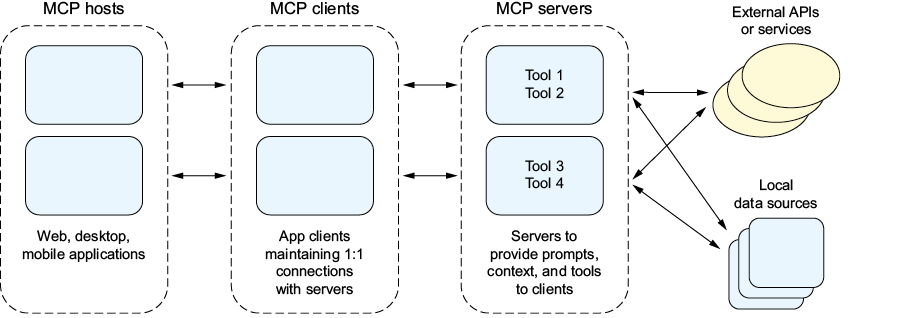
Illustrates the interaction between MCP servers and clients. section 8.14







