An MCP server exposes tools, prompts, and resources through the Model Context Protocol so compatible AI applications can use external capabilities without custom wiring for each integration. An MCP client discovers and invokes those capabilities; the server executes requests and returns structured results. The client handles protocol communication, while an AI agent makes decisions about which capabilities to use. section 12.0 section 12.2
Register capabilities on a server instance according to what clients need:
- Tools perform actions, such as fetching data from an external API, and return content the client can pass back to the application. section 12.4.1
- Prompts provide reusable instructions, such as a message requesting a concise summary of a retrieved result. section 12.4.1
- Resources provide directly accessible context, such as a Markdown document describing the server’s available capabilities. section 12.4.1
A local API-backed tool
In a Next.js chat application, a separate Node.js MCP server registers a get-chuck-joke tool that calls a public jokes API. The Next.js API route starts a stdio client transport, retrieves the server’s tools, and supplies them to the Vercel AI SDK’s model interaction. A tool request travels to the server, which performs the HTTP fetch and returns text content; the model does not call the external API directly. The server handles unsuccessful responses and fetch errors with text fallbacks. The local server communicates over stdin/stdout rather than exposing its own HTTP endpoint. section 12.3.2 section 12.4.1
Figure 12.3 How the Vercel AI SDK communicates with a local MCP server through stdio transport. The MCP client spawns the server as a separate Node.js process, and they exchange JSON-RPC messages via stdin/stdout. When the model calls a tool like get-chuck-joke(), the request flows through stdio to the MCP server, which executes the actual HTTP request and returns the response.
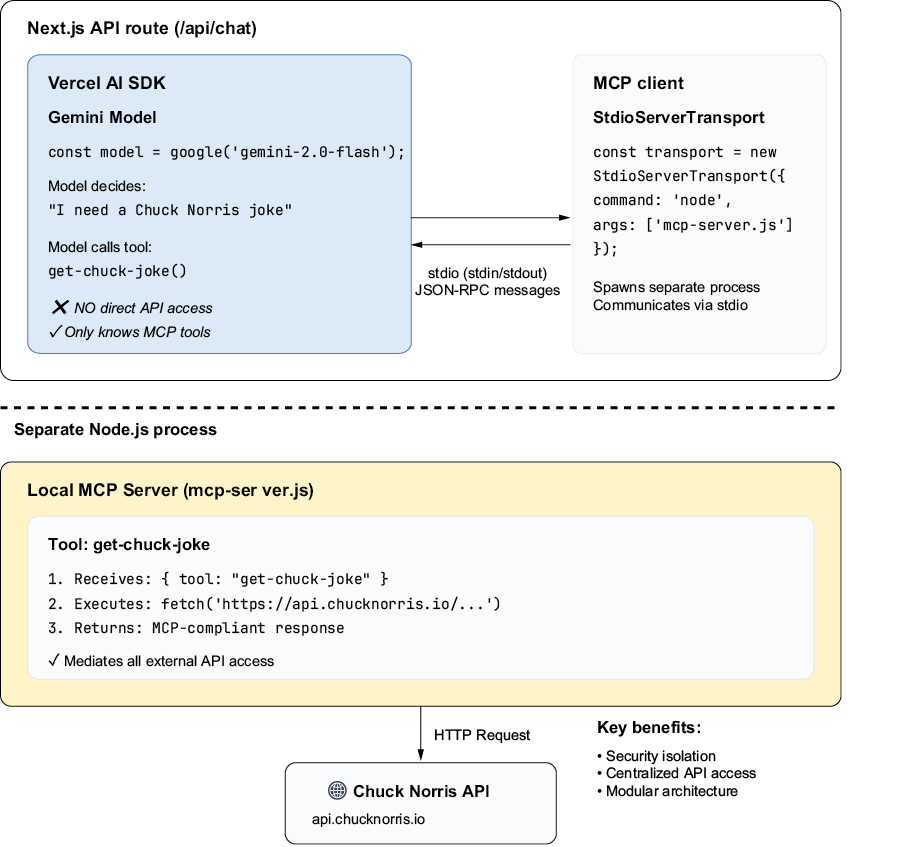
Follow the tool request from the client through the local stdio transport to the server’s HTTP call and back. section 12.3.2
The separation keeps external-service access and sensitive logic out of the model integration, but the server still needs ordinary operational care: manage API keys, control access, monitor performance, and maintain reliable uptime. Give resources and prompts clear identifiers and predictable responses. During development, use MCP Inspector to inspect and test registered capabilities. If an application must coordinate many independent servers, an MCP gateway can provide one interface for routing, security, and shared context. section 12.3.3 section 12.4.2 section 12.4.1 section 12.6.1











